The appointment-scheduling software market alone is projected to add $257.9 million in growth between 2024 and 2029, growing at a 9.4% compound annual rate, according to a 2025 Research and Markets industry forecast. That's real money being spent on tools meant to eliminate back-and-forth coordination.
But here's the problem: most businesses, especially field service and trade companies, treat automated scheduling like a fancy calendar. They miss the matching logic and rules underneath it entirely, and that leads to picking the wrong tool for the job.
This guide breaks down what automated scheduling actually is, how it works stage by stage, and where it delivers the most value, including for field-based trades like glass and glazing.
Key Takeaways
- Automated scheduling applies rules and algorithms to assign, adjust, and optimize job times automatically
- The process runs through four stages: initiation, matching, regulation, and output
- Client-facing booking and internal workforce scheduling solve different problems yet must work together
- Field service and trade businesses gain the most value when scheduling integrates with job costing and CRM
What Is Automated Scheduling?
Automated scheduling is software that uses predefined rules, data, and algorithms to create and manage appointment or work schedules without manual coordination. Instead of someone calling around to check availability, the system does the matching for you.
Manual scheduling relies on emails, phone calls, or spreadsheets to line up availability. It's slow. It's error-prone. And it falls apart the moment a business grows past a handful of jobs a week.
What automated scheduling is not: a shared digital calendar. A calendar displays dates. A true scheduling engine actively assigns, matches, or optimizes based on constraints like:
- Time windows and business hours
- Skills or certifications required
- Location and travel distance
- Equipment or material availability
Oracle's field-service documentation defines this distinction clearly: routing and scheduling engines evaluate activities against skills, time slots, travel, and capacity data before producing an assignment. A calendar just holds the result — it doesn't compute it.
This matters because rules-based and AI-assisted scheduling engines remain essential even as new tools emerge. Businesses still need something that reconciles competing constraints automatically, whether that's a sales rep's availability or a glazing crew's equipment schedule.
There are two broad categories worth knowing upfront:
- Client-facing appointment scheduling: external people book time with you directly
- Internal/workforce scheduling: you assign staff, crews, or resources to jobs
The mechanics behind these two differ meaningfully, which we'll get into shortly.
How Does Automated Scheduling Work?
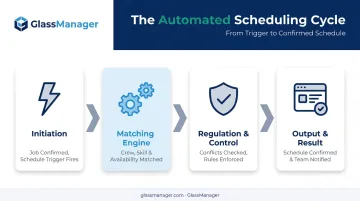
Automated scheduling runs through a repeatable cycle: initiation, core matching, regulation, and output. Each stage shapes what the final schedule looks like, and a weakness in any one of them causes problems downstream.
Initiation
The process starts one of two ways. A customer clicks a booking link and picks a slot. Or a new job, work order, or lead record gets created and triggers scheduling logic automatically.
These triggers fall into two categories: manual, when someone clicks "book now" or a dispatcher creates a job by hand, and automatic, when a new lead syncs from a CRM or a recurring maintenance job fires on schedule.
Here's where things commonly break: incomplete availability data or an unsynced calendar. If a technician's calendar isn't updated in real time, the system doesn't know they're already booked. That's how double-booking happens right at the starting line.
Core Operation (Matching Engine)
This is where the actual work happens. The system cross-references open slots or available resources against your rules — skills, location, time windows, equipment — and generates viable options.
The engine then scores or ranks those options. Maybe it's the soonest available crew with the right certification. Maybe it's the closest technician to minimize drive time. It either books automatically or presents the top choices for a human to confirm.
This isn't theoretical. In a US utility pilot using AI-driven schedule optimization, McKinsey found field-worker productivity rose 20%-30%, and scheduler productivity rose 10%-20% — equal to one to two hours saved per scheduler, per day. That's the difference between an algorithm running constraint math and a person manually cross-checking spreadsheets.
Regulation / Control
Matching a job to a slot isn't enough. The system also has to enforce rules and catch problems as they happen.
This stage handles:
- Buffer times between appointments to prevent back-to-back overruns
- Labor rules, including overtime limits and predictive scheduling laws
- Business hours and daily capacity limits so no resource gets overloaded
- Real-time conflict detection when a cancellation, reschedule, or no-show occurs
Labor compliance isn't optional in a lot of states. Oregon, for example, requires covered retail, hospitality, and food-service employers with 500 or more employees worldwide to provide written schedules 14 calendar days in advance, according to the Oregon Bureau of Labor and Industries. Shift changes with less than 10 hours' rest can trigger premium pay.
A scheduling system built for compliance flags these automatically, while one that isn't leaves you exposed.
Without this regulation layer, businesses risk overbooking, compliance violations, or wasted labor hours sitting idle.
Output / Result
The final stage produces a confirmed schedule entry, automated notifications to everyone involved, and an updated job or work order status.
From there, the output feeds downstream systems: invoicing, job costing, dispatch boards, project timelines. This is where the schedule stops being just a booking and starts driving the rest of the operation.
Platforms built for trades take this further. GlassManager, for instance, turns confirmed scheduling entries directly into Gantt chart project timelines (color-coded bars showing task duration, dependencies, and milestones across the project lifecycle), alongside automated SMS and email reminders that keep office, shop, and field teams looking at the same information.
Better output quality translates into measurable outcomes: fewer no-shows, higher resource utilization, and faster billing cycles once job data flows straight into invoicing.
Types of Automated Scheduling
Not all scheduling software solves the same problem. Two categories cover most use cases, and understanding which one you need (or whether you need both) determines whether a tool actually fits your business.
Client-Facing Appointment Scheduling
This type lets external customers or prospects pick an open time themselves through a booking link or page. It's the model behind consultation bookings, sales demos, and quote appointments.
The customer sees available slots, picks one, and the system confirms it. Simple on the surface, but the constraint logic underneath (business hours, buffer time, staff availability) still has to run correctly or double-bookings happen.
Internal / Workforce & Field Scheduling
This type assigns internal staff, crews, or resources to jobs or shifts based on skills, availability, and location. It's the backbone of field service, retail, and restaurant operations.
Businesses running multi-step projects — think contractors or glaziers — typically need both types working together: appointment booking for the initial estimate visit, paired with crew and job scheduling for the actual installation. A glazier without both is either losing leads at the booking stage or losing efficiency at the dispatch stage. GlassManager pairs both models in one platform, matching appointment booking for estimates with crew scheduling and dispatch for installation jobs.
Where Automated Scheduling Is Used
Automated scheduling fits into a workflow at multiple points: lead intake and quoting, job or work order creation, crew and resource assignment, on-site execution, and follow-up or invoicing.
It performs best under specific conditions:
- Multiple simultaneous jobs running at once
- A mobile or field-based workforce
- Fluctuating demand that makes manual planning unreliable
- Multi-step projects requiring office-to-field coordination
The mechanics shift by industry. Salons and healthcare need simple appointment matching. Restaurants and retail need shift-based staffing. Contractors, glaziers, and HVAC companies need project and field coordination that accounts for jobs, crews, and materials together, not just time slots.
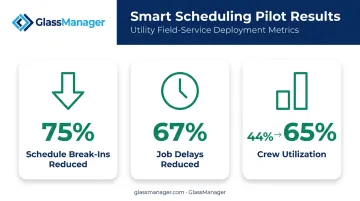
Utility field operations offer a useful benchmark. In one pilot cited by McKinsey, smart scheduling cut schedule break-ins by 75%, reduced job delays by 67%, and lifted crew utilization from 44% to 65%. At scale, field coordination determines whether crews sit idle or stay booked.
Glazing work follows a similar logic, just with different constraints. A glazier has to coordinate:
- Site measurements and estimate visits
- Fabrication timelines tied to material lead times
- Delivery scheduling
- Installation crew assignment
Miss one link in that chain and the whole job slips. GlassManager customers describe this shift firsthand.
Silver State Glass & Mirror moved off a fully paper-based system. Owner Eric Hooiman says the change "saves us money" and calls it "a game changer."
Quality Reflections Glassworks went further. Guillermo Ramirez says the platform "helped us go from red to green" and calls it "the backbone of our evolving operation."
Neither quote is about scheduling alone, but both point to what happens when job coordination stops living in someone's head or a stack of paper.
Conclusion
Automated scheduling runs on a repeatable logic: initiation, matching, regulation, output. That cycle replaces manual coordination and reduces human error.
But the tool choice matters more than the calendar feature. Field service and trade businesses get the most value when scheduling is integrated with job costing, CRM, and crew management, not treated as a standalone booking widget bolted onto everything else. GlassManager, for example, unifies scheduling with job costing and CRM in one platform.
Frequently Asked Questions
Is there an automated schedule maker?
Yes. Options range from simple booking-link generators to full workforce and job-scheduling platforms. The right choice depends on whether you're booking appointments or coordinating crews and jobs.
How do you automate meeting scheduling?
Connect your calendar, set your availability rules, and share a booking link. The software confirms bookings and sends notifications automatically from there.
What's the difference between automated scheduling and traditional scheduling software?
Traditional tools mainly display or store schedule data. Automated scheduling actively assigns, matches, and adjusts schedules based on rules you define.
Can automated scheduling work for field service or trade businesses?
Yes. Field service and trade businesses use it to coordinate jobs, crews, and installation timelines. GlassManager's Gantt chart and automated reminder features, for instance, are built specifically for glass contractors.
Does automated scheduling require AI?
No. Basic automated scheduling runs on rules-based logic. More advanced systems add AI to optimize matches, but both qualify as automated scheduling.
Is automated scheduling software expensive?
Pricing varies by feature depth and team size. GlassManager, for example, offers Lite, Pro, and Enterprise tiers, so businesses only pay for the features they need right now.