Introduction
A missed appointment costs more than the lost job. It costs the follow-up call, the rescheduled crew, and the customer who books with a competitor instead.
For service and trade businesses juggling field crews, office staff, and client appointments, scheduling delays and double-bookings drain revenue every week:
- A tech shows up to the wrong address.
- A glazier's crew sits idle waiting on a job that got moved.
- An office manager spends her morning untangling a calendar conflict that a text message could have prevented.
The right scheduling software fixes more than a calendar. It improves crew utilization, cuts no-shows, and ties directly into invoicing and job costing so nothing falls through the cracks.
This guide compares the best scheduling software of 2026, covering both general business tools and specialized trade platforms like GlassManager for glass and glazing contractors. Match the software to how your business actually runs.
TL;DR
- Scheduling software ranges from simple meeting bookers to full field service platforms with dispatch and job costing.
- Top picks: GlassManager, Jobber, ServiceTitan, Housecall Pro, and Connecteam.
- Selection criteria: ease of use, integrations, mobile access, and pricing transparency.
- Industry-specific tools like GlassManager often beat generic schedulers for trades because they connect scheduling to quoting and invoicing.
Overview of Scheduling Software for Service and Trade Businesses
Scheduling software is any digital tool that lets a business assign, track, and communicate appointments or job times to staff and clients without endless phone tag. That's the simple definition. The harder part is picking the right category for your business.
There are three distinct types worth knowing:
- Meeting schedulers (Calendly-style): built for booking one-on-one appointments or consultations
- Employee shift schedulers (Connecteam-style): built for managing hourly staff, shift coverage, and time tracking
- Field service/job schedulers (Jobber, ServiceTitan, GlassManager-style): built for dispatching crews, tracking job stages, and connecting scheduling to invoicing
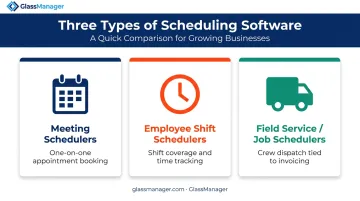
Choosing the wrong category is the single most common mistake buyers make, and it's expensive.
Software spend isn't trivial either. Zylo's 2025 SaaS Management Index found businesses now spend an average of $4,830 per employee annually on SaaS tools, up nearly 22% year over year.
That number climbs fast when a company runs a separate scheduler, a separate CRM, and a separate invoicing tool that don't talk to each other.
We evaluated the tools below on four factors: integration depth, mobile usability, automation features, and fit for field-based versus office-based teams.
Best Scheduling Software of 2026
This list blends specialized trade and field service platforms with general scheduling tools, because your business type determines which one actually fits. A landscaping crew and a dental office have nothing in common operationally, and their software shouldn't either.
GlassManager
GlassManager is an all-in-one business management platform built specifically for residential and commercial glass and glazing businesses. Instead of stitching together a scheduler, a CRM, an estimating tool, and invoicing software, glaziers run all of it from one system.
What makes it stand out:
- Automated SMS and email job reminders that reduce no-shows and keep customers informed of appointment changes
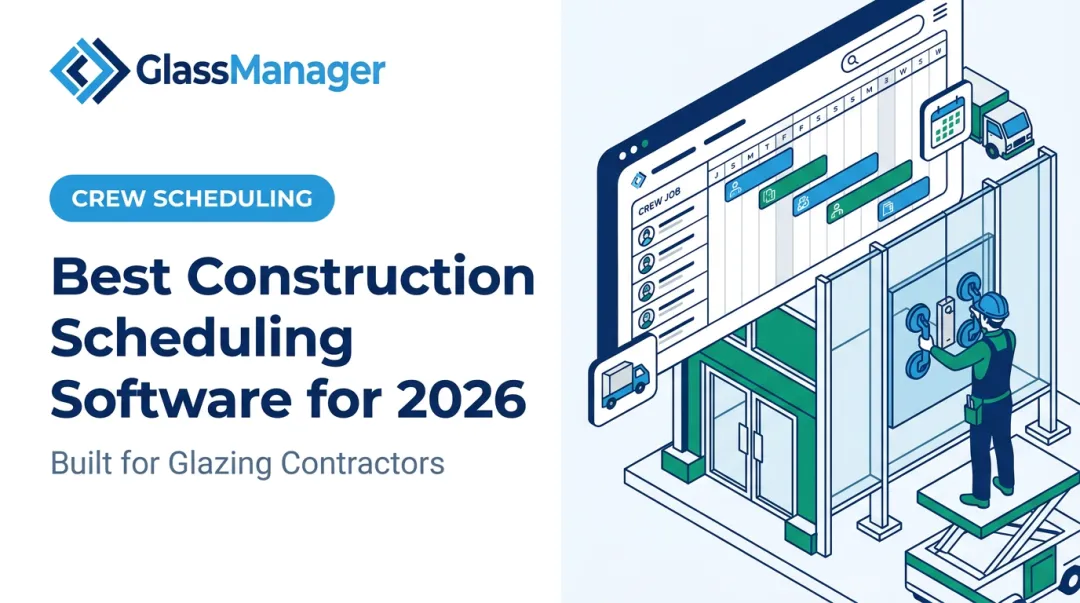
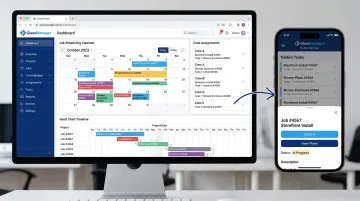
- Gantt chart project timelines for tracking glazing jobs stage by stage, from estimate to installation
- A mobile field app that gives crews real-time job updates, even with limited job-site connectivity
- GlassAI-powered quoting, which converts vendor quotes into customer-ready proposals and feeds directly into scheduling and job costing
Companies like Silver State Glass & Mirror and A Glasco use GlassManager to keep office, shop, and field teams working off the same information, rather than three different spreadsheets.
| Category | Details |
|---|---|
| Key Features | Job and crew scheduling, Gantt chart timelines, mobile field app, automated reminders, integrated invoicing and accounting sync |
| Pricing | Lite plan starts at $65/user/month (2-user minimum); Pro starts at $95/user/month (3-user minimum); Enterprise is custom-quoted for larger operations |
| Best For | Residential and commercial glass and glazing contractors who want one platform instead of disconnected scheduling, CRM, and invoicing tools |
The Pro tier adds progress billing, AIA-style billing, inventory management, and route planning — features that matter once a glazing business is juggling both residential and commercial projects.
Jobber
Jobber is a field service management platform used across landscaping, HVAC, and general contracting. It handles job scheduling, dispatching, and client communication in one place.
Where it excels:
- Drag-and-drop scheduling calendar for quick job assignment and rescheduling
- Route optimization that builds efficient daily routes for crews (available on higher-tier plans, not the entry Core plan)
- Client Hub where customers can request work, approve quotes, and pay invoices online
| Category | Details |
|---|---|
| Key Features | Scheduling calendar, route planning, quoting, invoicing |
| Pricing | Core plan starts at $29/month billed annually, or $49/month with no commitment, for one user |
| Best For | Multi-trade field service businesses needing route planning and crew dispatch tools |
ServiceTitan
ServiceTitan is an enterprise-grade field service platform popular with larger HVAC, plumbing, and electrical companies running dozens of technicians.
Key strengths:
- Advanced dispatch board with drag-and-drop technician assignment and real-time tracking
- Call booking integration that opens customer records directly from an incoming call
- Deep reporting dashboards on technician performance, including revenue and close-rate metrics
| Category | Details |
|---|---|
| Key Features | Dispatch board, technician tracking, call booking, reporting dashboards |
| Pricing | Custom, quote-based pricing per technician — no published starting rate |
| Best For | Larger commercial trade businesses with dozens of technicians needing advanced dispatch controls |
Because pricing requires a sales conversation, ServiceTitan tends to suit companies that have outgrown simpler tools and need the reporting depth to match.
Housecall Pro
Housecall Pro serves small to mid-sized home service businesses that want scheduling without a steep learning curve.
What makes it different:
- Simple drag-and-drop scheduling that non-technical staff can pick up quickly
- Automated customer notifications, including SMS reminders and arrival alerts
- Built-in payment processing, with card, ACH, and Klarna options
| Category | Details |
|---|---|
| Key Features | Online booking, dispatch, automated reminders, payment processing |
| Pricing | Basic plan starts at $59/month billed annually, or $79/month billed monthly |
| Best For | Small home service teams wanting an easy-to-learn scheduler with payment collection built in |
Connecteam
Connecteam is a workforce management app focused on employee shift scheduling rather than client-facing job appointments.
Notable features:
- Drag-and-drop shift builder with AI-assisted auto-scheduling
- Free-for-life plan for small teams
- Shift swap requests and time-off management built into the same app as time tracking
| Category | Details |
|---|---|
| Key Features | Shift scheduling, time clock, shift swaps, time-off management |
| Pricing | Free for up to 10 users; paid plans start around $29/month (billed annually) for the first 30 users |
| Best For | Businesses managing deskless staff schedules and shift coverage rather than client appointments |
How We Chose the Best Scheduling Software
We tested each platform on setup speed, mobile usability, and how well scheduling actually connects to invoicing, CRM, and job costing rather than sitting as an isolated calendar.
A common buyer mistake shows up repeatedly: choosing a generic meeting scheduler when the business needs job and crew dispatch. This leads to disconnected data, manual re-entry, and a calendar that doesn't talk to the invoice.
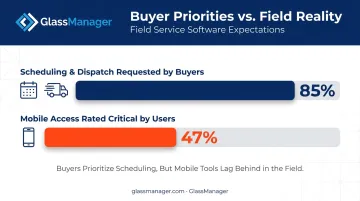
There's real evidence of this mismatch. Software Advice's analysis of over 4,500 field service buyer conversations found that 85% of buyers requested scheduling and dispatch features. Yet among 1,617 verified users, only 47% rated mobile access as critical, even though field crews depend on it daily. Buyers often underweight the mobile experience until they're already using the tool.
Factors we weighed:
- Integration depth with accounting and CRM tools
- Mobile and offline access for field teams
- Automation of reminders and follow-ups
- Pricing that scales with team size instead of ballooning per-seat costs
Conclusion
The best scheduling software matches how your business actually operates, whether that means office meetings, employee shift rotations, or field crews juggling multiple jobs a day. Popularity alone won't get the job done.
Before committing, weigh scalability and integration with your existing CRM, invoicing, and accounting tools more heavily than brand recognition. A well-known name that doesn't connect to your invoicing system will cost you more in manual work than it saves in scheduling time.
For glass and glazing businesses specifically, that fit usually points to a platform built for the trade. GlassManager combines scheduling, quoting, and invoicing in one system, so office, shop, and field teams work from the same job record instead of three disconnected tools. If that gap sounds familiar, request a GlassManager demo to see the shared job record in action.
Frequently Asked Questions
What are scheduling programs?
Scheduling programs are digital tools that let businesses assign, track, and share appointments, shifts, or job times with staff and clients. They replace manual calendars and back-and-forth phone calls with automated, shareable schedules.
What's the best software for scheduling?
It depends on your business type. Office teams often prefer Calendly-style meeting schedulers, while field service and trade businesses benefit more from platforms like GlassManager or Jobber that combine scheduling with job management.
How much does scheduling software typically cost?
Pricing ranges from free plans for small teams to $29-$95 per user per month for most published tiers, with higher tiers exceeding $100/month. Enterprise field service platforms like ServiceTitan use custom, quote-based pricing instead.
Can scheduling software integrate with invoicing and accounting tools?
Yes, most modern platforms sync with accounting software like QuickBooks or Sage 50. All-in-one platforms like GlassManager eliminate double data entry by connecting scheduling directly to invoicing and job costing.
Is there scheduling software designed specifically for the glass and glazing industry?
Yes. GlassManager is purpose-built for residential and commercial glaziers, combining scheduling with CRM, estimating, and job costing in one platform rather than requiring several disconnected tools.
What features should trade and field service businesses look for in scheduling software?
Look for mobile and offline access for crews, automated client reminders, route or crew dispatch tools, and integration with invoicing and job costing. Without these, scheduling data stays siloed from the rest of the business.