Introduction
A single mid-size commercial job can generate thousands of drawings, RFIs, submittals, and change orders before the first wall goes up. Miss one revision, and a crew builds from an outdated set overnight.
That's not a hypothetical risk. A 2018 Autodesk/FMI study found poor project data and miscommunication caused 48% of all rework in US construction, totaling $31.3 billion. The figure is dated, but the underlying problem hasn't gone away.
Document management software fixes this by giving office and field teams one version of truth, with version control, audit trails, and faster approvals baked in. As project volumes climb in 2026, that alignment matters more than ever.
This guide ranks the top construction document management platforms for 2026, covering both general contractor tools and a dedicated option for specialty trades like glass and glazing.
Key Takeaways
- Centralizes drawings, specs, RFIs, and contracts with built-in version control and audit trails.
- Cuts rework, speeds approvals, and keeps field crews working from current documents.
- Security, integrations, mobile access, and industry fit matter more than brand name alone.
- Enterprise Common Data Environments (CDEs) suit large multi-party projects; trade-specific platforms like GlassManager fit specialty contractors better.
Overview of Construction Document Management Software in the Construction Industry
Construction document management software stores, versions, and routes drawings, specs, RFIs, submittals, and contracts across a project's full lifecycle, from bidding through execution to closeout.
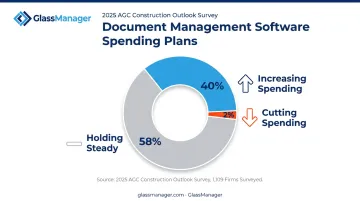
Contractors are investing accordingly. In AGC's 2025 Construction Outlook survey of 1,109 firms, 40% planned to increase spending on document-management software, compared to just 2% planning cuts.
That growth has produced a crowded field, with tools spanning two distinct categories:
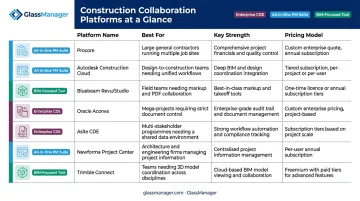
- Enterprise Common Data Environments (CDEs): built for multi-party governance across large, multi-stakeholder projects
- Trade-specific all-in-one platforms: designed around a single contractor's daily workflow, from bidding through closeout
The right fit depends on project scale and trade, not just name recognition.
Top Construction Document Management Software for 2026
The platforms below were shortlisted using five criteria:
- Version control depth: how granularly the tool tracks revisions and prevents outdated files from reaching the field
- Collaboration and workflow features: approval routing, markup tools, correspondence tracking
- Integrations: connections to existing PM, accounting, and BIM software
- Mobile access: field usability on phones and tablets
- Market adoption: how widely the tool is used across GC and AEC teams
Procore
Procore built its reputation as an all-in-one construction PM platform, and its Documents module reflects that. Files link directly to budgets, RFIs, and field workflows instead of sitting in an isolated folder.
Machine learning auto-populates document metadata like type, description, and number during upload, which cuts manual tagging. Mobile access and a large integration ecosystem round out the package.
| Category | Details |
|---|---|
| Pricing | Custom quote; contact Procore for current tiers |
| Key Features | Version control, automatic metadata tagging, mobile document access, hundreds of integrations |
| Best For | General contractors managing large, high-volume projects needing an all-in-one PM suite |
Autodesk Construction Cloud (Forma Data Management / Docs)
Autodesk Docs has been rebranded as Forma Data Management under the Autodesk Forma umbrella, though older resources may still use the previous name. It remains the standard for design-heavy AEC teams connecting design files and construction documents in one repository.
Native BIM/model integration and structured folder permissions distinguish it from generic file storage tools.
| Category | Details |
|---|---|
| Pricing | Per-user subscriptions from roughly $45/month (annual billing); enterprise quotes available. Verify current rates |
| Key Features | Version history, granular permissions, BIM coordination, Forma Build integration |
| Best For | AEC teams working heavily within the Autodesk design ecosystem |
Bluebeam Revu/Studio
Bluebeam Revu is the AEC-standard tool for PDF markup and measurement, used across design and construction teams for plan review. Studio Sessions layer real-time collaboration on top, letting multiple reviewers mark up the same PDF simultaneously.
- Batch automation tools speed repetitive markup tasks in Revu
- Studio Sessions support up to 500 attendees per session
- Every markup is logged in an audit trail for accountability
| Category | Details |
|---|---|
| Pricing | Annual per-user subscriptions; tiers vary. Verify current pricing |
| Key Features | PDF markup/measurement tools, real-time Studio Sessions, audit trail on markups |
| Best For | Contractors and design teams whose workflow centers on PDF plan review |
Oracle Aconex
Aconex functions as a project-wide CDE built around formal, auditable review and approval workflows rather than casual file sharing. Correspondence, once logged, cannot be deleted or altered, which matters for disputes and compliance.
Configurable approval templates and dashboards tracking review status make it a fit for large, multi-party project teams.
| Category | Details |
|---|---|
| Pricing | Enterprise, quote-based; contact Oracle for current rates |
| Key Features | Configurable workflows, structured correspondence, immutable audit trails, analytics dashboards |
| Best For | Large, multi-party project teams needing formal governance and auditability |
Asite CDE
Asite aligns its CDE with ISO 19650, the international standard defining a Common Data Environment as an agreed source for collecting, managing, and disseminating information through a managed process. This structured approach goes well beyond a simple shared drive.
Model federation combines multiple 3D files into one multidisciplinary view, while configurable approval workflows and audit-ready reporting support governance-heavy projects.
| Category | Details |
|---|---|
| Pricing | Quote-based; verify current rates |
| Key Features | Version control, automated transmittals, BIM/model federation, audit-ready reporting |
| Best For | Project information managers needing ISO 19650 governance and BIM-connected control |
Newforma Project Center
Newforma takes a different approach: instead of replacing an existing PM stack, it consolidates email, RFIs, submittals, drawings, and field records around it.
Connectors link directly to Autodesk ACC/BIM 360, Bluebeam Studio, and Procore, so firms keep their current tools while gaining a unified correspondence hub.
| Category | Details |
|---|---|
| Pricing | Quote-based; verify current rates |
| Key Features | Centralized correspondence and documents, AEC tool connectors, construction admin workflows |
| Best For | Firms wanting integration-first document control without a full platform switch |
Trimble Connect
Trimble Connect handles a wider format range than most CDEs, from 2D drawings and PDFs to 3D models and point-cloud scans, making it useful for teams coordinating mixed file types across office and field.
Permissions run from Full Access to No Access at the folder level, and re-uploading a file automatically creates a new tracked version.
| Category | Details |
|---|---|
| Pricing | Personal tier free; paid tiers roughly $12.99–$23.95/user/month. Verify current rates |
| Key Features | CDE with permissions, version history, cross-device model/file coordination |
| Best For | Teams coordinating mixed model and file sets needing a BIM-friendly CDE |
Document Management for Specialty Trade Contractors (Glass, Glazing & Beyond)
Every platform above was built for general contractors and multi-party projects. That's a problem for specialty trades. A glazier doesn't just need drawing version control, they need material quotes, glazing schedules, and takeoffs handled alongside those documents, not bolted on separately.
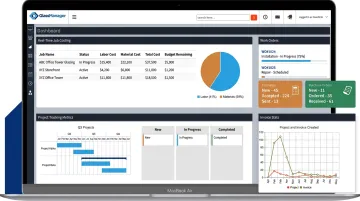
This is where GlassManager fits. It's a business management platform built specifically for residential and commercial glaziers, folding estimates, jobs/work orders, and invoices into one system alongside CRM, scheduling, and field management.
AI-Powered Quoting Closes the Turnaround Gap
Generic DMS tools store documents. They don't turn a vendor quote into a client-ready proposal. GlassAI does, through a three-step process:
- Import the vendor quote: drag-and-drop a PDF, and the AI extracts pricing and line items automatically
- Apply markup: pre-configured pricing rules, terms, and branding are added without manual input
- Send the customer quote: a polished, branded proposal goes out in seconds
That speed matters when a competing glazier is still copying numbers into a spreadsheet. Shops running one or two estimators typically see turnaround drop from days to minutes, which converts more of the leads they already have without adding headcount.
Accounting Sync Removes Duplicate Entry
GlassManager integrates with QuickBooks Online, QuickBooks Desktop, and Sage 50, which eliminates several common re-entry points:
- Invoices sync automatically instead of being recreated in accounting software
- Payments recorded in GlassManager export directly, keeping cash flow data accurate
- Vendor invoices and timesheets batch-export rather than requiring manual duplication
Real-time job costing then gives owners visibility into labor, materials, and overhead as a project moves, not just after it closes out. For a glazier juggling several active installs, that same visibility catches cost overruns early, giving owners room to adjust bids, reallocate crew hours, or renegotiate vendor pricing before margins slip on a job that looked profitable at signing.
Real Results From Glass Shops
Silver State Glass & Mirror moved from an entirely paper-based system to GlassManager. Owner Eric Hooiman put it plainly: "We previously ran everything through a paper system and with their system we save a ton of time and money." The switch also contributed to revenue growth, according to GlassManager's case study.
How We Chose the Best Construction Document Management Software
The most common mistake buyers make is picking a tool based on brand recognition, then discovering it doesn't match their project size or trade. A CDE built for enterprise design-build governance is overkill for a five-person glazing crew, and vice versa.
We weighed each platform against factors that tie directly to business outcomes:
- Security and compliance: audit trails and permission controls that hold up under dispute or regulatory review
- Integration depth: genuine connections to existing PM, BIM, or accounting tools, not just file export
- Mobile and field usability: whether crews can actually access current documents on-site
- Industry specificity: fit for the trade's actual document types, not generic construction paperwork
Tools that score well here tend to produce fewer RFIs, faster approvals, and less costly rework.
Conclusion
There's no single "best" construction document management software for 2026. The right choice depends on project scale, trade specialization, and how it fits your existing tech stack, not which vendor has the biggest booth at the trade show.
Once you've matched a platform to that fit, pilot your shortlist against real project documents before signing anything. Weigh total cost of ownership, not just the sticker price on the pricing page.
For glass and glazing contractors specifically, that often means finding document control bundled with estimating, scheduling, and invoicing in one place, worth exploring in GlassManager.
Frequently Asked Questions
What is construction document management software?
It's a centralized platform for storing, versioning, and controlling drawings, specs, RFIs, and contracts throughout a project. It replaces scattered email threads and shared drives with one auditable source of truth.
What features should I look for in construction document management software?
Prioritize version control, security/permissions, mobile access, and integrations with your existing PM or accounting tools. Without these, teams end up working from outdated files.
How much does construction document management software cost?
Pricing ranges from per-seat SMB tools charging roughly $10–$50 per user monthly to quote-based enterprise CDEs (Common Data Environments) that can cost several times that. Weigh total cost against your actual project volume, not just the sticker price.
Can small construction or specialty trade teams afford dedicated document management software?
Yes. Scalable, tiered options exist, including trade-specific all-in-one platforms like GlassManager, built for glaziers rather than adapted from generic enterprise tools.
How does document management software reduce rework and delays on construction projects?
Version control and linked RFIs/submittals keep everyone working from the latest approved documents. That prevents crews from pricing or building off outdated drawings, which is where costly rework usually starts.
Is there document management software built specifically for subcontractors like glaziers?
Generic DMS tools serve general contractors broadly. Platforms like GlassManager go further, pairing document control with trade-specific estimating, scheduling, and invoicing built around how glass and glazing businesses actually operate.