Contractors and specialty trades alike are turning to job costing software to protect what's left of their profit. Without it, budget overruns hide until the final invoice, and bid accuracy becomes guesswork.
This guide breaks down what to look for in construction job costing software, ranks the top platforms for 2026, and includes options built specifically for specialty trades like glass and glazing. By the end, you'll know which type of tool fits your business.
TL;DR
- Job costing software tracks labor, materials, and overhead against estimates to protect margins.
- Prioritize job-level cost tracking, mobile field access, and accounting integrations.
- Top 2026 picks span general contractors, residential builders, and specialty trades.
- GlassManager leads for glass and glazing contractors needing job costing tied to quoting.
- Match your pick to business size, trade specialization, and existing workflow needs.
Overview of Job Costing Software in the Construction Industry
Construction job costing assigns every dollar spent to a specific project, phase, and cost code, rather than lumping expenses into a general ledger. That distinction matters more than ever.
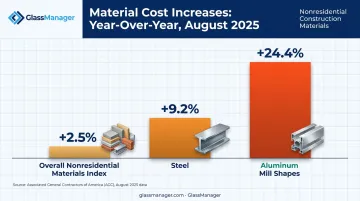
The Associated General Contractors of America reported that the price index for materials and services used in nonresidential construction rose 2.5% year over year as of August 2025. Aluminum mill shapes jumped 24.4% over the same period. Steel climbed 9.2%.
When input costs move that fast, a bid-stage estimate goes stale within weeks. Contractors need actual-cost data flowing in daily, not a spreadsheet reconciled after the job closes.
This pressure isn't limited to general contractors. Specialty trades face their own volatility:
- Electricians deal with copper and conduit price swings
- HVAC contractors absorb refrigerant and equipment cost jumps
- Glaziers manage glass breakage, custom cutting, and fabrication time
Below, we rank the platforms handling this challenge best in 2026, starting with general-purpose tools and moving into trade-specific solutions.
Key Features to Evaluate in Construction Job Costing Software
Not all job costing tools operate at the same depth. Here's what separates the tools worth paying for from the ones that just look good in a demo.
Cost Tracking Granularity
Software that only tracks costs at the job level tells you whether a project made money. It won't tell you where the money leaked.
Look for platforms that drill down to:
- Phase level (foundation, framing, finishing)
- Cost code level (labor, materials, equipment, subcontractors)
- Line-item level (specific materials or tasks within a phase)
Procore's job costing framework breaks costs into labor, materials, equipment, subcontractor, and overhead categories, then applies cost codes for even finer tracking. That's the benchmark to match.
Real-Time Data Flow and Mobile Access
Delayed cost information means delayed corrections. If a crew logs hours on Friday but the office doesn't see it until Monday's reconciliation, you've already lost three days of visibility.
CFMA guidance on job costing notes that tablet or smartphone timekeeping can post labor and equipment hours directly to jobs, cutting out the re-entry step entirely. Field teams also need:
- Offline access for jobsites without reliable signal
- Photo capture for documentation and dispute prevention
- Status updates that sync the moment connectivity returns
Integration Ecosystem and Reporting Depth
Two-way sync with accounting, payroll, and estimating tools prevents duplicate data entry, which is where most job cost errors originate. One-way syncs create a bottleneck where someone still has to manually reconcile numbers.
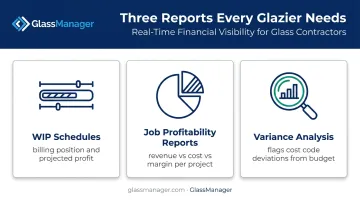
On the reporting side, three report types separate basic tools from serious ones:
- WIP schedules: show billing position and projected profit across active jobs
- Job profitability reports: compare revenue, cost, and margin per project
- Variance analysis: flag where actual costs diverged from budget, by cost code
Finally, specialty contractors need cost drivers unique to their trade. A glazier tracking material-specific costs like custom cutting and fabrication time will get more value from a purpose-built tool than a generic construction platform stretched to fit.
Top Construction Job Costing Software for 2026
We ranked these tools based on cost tracking depth, integration capability, mobile usability, trade fit, and verified customer feedback. Here's how they stack up.
GlassManager
GlassManager is an all-in-one platform built specifically for residential and commercial glass and glazing contractors. It consolidates CRM, estimating, job costing, scheduling, and invoicing into one system, so glaziers aren't stitching together five different tools.
Why it stands out: Job costing connects directly to GlassAI, GlassManager's AI-powered quoting tool, rather than running as a separate add-on. Once a quote gets approved, the pricing and material data carry forward automatically into the job costing module, so actual costs get measured against the original estimate without re-entry.
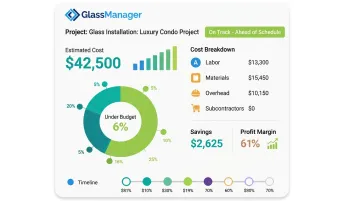
The platform tracks labor, materials, and overhead in real time. A sample job dashboard might show an estimated cost of $42,500 against a 61% profit margin and a status of 6% under budget, flagging savings before the job even closes. Scheduled tasks also auto-generate timesheets, so labor hours flow straight into cost tracking rather than getting typed in after the fact.
| Key Features | Real-time job costing, AI-powered quoting (GlassAI), mobile field app, AIA progress billing (G702/G703), purchase order tracking, integrated SMS/Messenger, Gantt chart scheduling |
| Pricing | Lite, Pro, and Enterprise tiers starting around $65/user/month, scaling with features and support level (see GlassManager's pricing page for current tiers) |
| Best For | Residential and commercial glass and glazing businesses that need an industry-specific alternative to generic construction software |
Procore
Procore is a cloud-based construction management platform widely used by general contractors and owners running enterprise-scale projects.
Why it stands out: The job costing module handles budget-to-committed cost comparisons and time-phased forecasting, with mobile change events tying field activity directly to financial data. The tradeoff is cost. Pricing is volume-based and quote-only, which puts it out of reach for smaller shops.
| Key Features | Budget vs. actual tracking, change order management, cost forecasting |
| Pricing | Custom, quote-based, tied to selected products and construction volume |
| Best For | Large general contractors managing multiple complex projects |
Buildertrend
Buildertrend is cloud-based software built for residential builders and remodelers who prioritize client communication alongside project management.
Why it stands out: Cost tracking runs through original, revised, committed, projected, and actual figures by cost code. Approved change orders update budgets automatically, and mobile receipt scanning assigns purchases to the right job on the spot. It's less suited to complex commercial work, but for residential remodels, the client-facing portal is a real differentiator.
| Key Features | Real-time cost tracking, client portal, purchase order management |
| Pricing | Custom quote, with a 10% discount for annual upfront payment |
| Best For | Residential builders and remodelers prioritizing client communication |
Foundation Software
Foundation targets mid-to-large contractors who need deep financial control, not just project tracking.
Why it stands out: Cost tracking by phase and custom cost codes (or CSI divisions) gives finance teams granular visibility, backed by strong compliance tools including certified payroll. The learning curve is steeper than most competitors, which makes sense given the depth on offer.
| Key Features | Phase and cost-code level tracking, payroll and certified payroll tools, WIP and cash-flow reporting |
| Pricing | Custom, modular pricing based on selected modules |
| Best For | Mid-to-large contractors needing detailed cost code control |
Knowify
Knowify is a cloud-based job costing and estimating suite built for small specialty trade contractors, think electrical, plumbing, and HVAC crews.
Why it stands out: Material cost tracking via receipt capture and GPS-based time tracking make it easy for small crews to keep cost data clean without a back-office team. It struggles at scale for operations running many simultaneous crews.
| Key Features | Material cost tracking, GPS time tracking, CRM and estimating modules |
| Pricing | Starts at $99/month (annual billing) for one user, plus $29/month per additional user |
| Best For | Small specialty trade contractors focused on material and labor cost control |
JobTread
JobTread combines estimating and project management for builders, remodelers, and specialty contractors.
Why it stands out: Cost-plus, fixed-price, and time-and-material estimating templates tie directly into job costing and change order tracking, so pricing method doesn't dictate a workaround.
| Key Features | Estimating templates, change order management, time tracking |
| Pricing | Starts at $199/month plus $20/month per internal user (20% discount for annual billing) |
| Best For | Contractors wanting tight integration between estimating and job costing |
How We Chose the Best Construction Job Costing Software
We weighted cost tracking granularity, integration depth, mobile usability, and trade-specific fit above brand recognition. A well-known name doesn't help if the software can't track your actual cost structure.
The most common buying mistake we see: contractors choosing generic construction software without checking whether it supports their trade's specific cost drivers. Union labor rates, phase-based billing, and material waste calculations don't always translate cleanly across trades.
We also factored in:
- Customer reviews and reported satisfaction
- Support responsiveness (response time, hours, channel availability)
- Scalability across pricing tiers, from 5-person crews to 50-plus employee operations
Conclusion
There's no single best construction job costing software. The right pick depends on project complexity, trade specialization, and how well a tool fits your existing estimating and accounting workflow.
Before committing, evaluate ongoing costs, integration needs, scalability, and how responsive the vendor's support team is, not just the sales pitch. A platform that looks affordable at 3 users can get expensive fast once you're paying per-seat fees for a 15-person crew.
For glass and glazing contractors specifically, a purpose-built platform tends to outperform generic tools stretched to fit. GlassManager ties job costing directly to quoting, scheduling, and field management, so the numbers you generate at the estimate stage stay connected all the way through to the final invoice.
Frequently Asked Questions
What are the 7 steps in job costing?
There's no single standardized 7-step model, but the typical process includes identifying the job, estimating costs, and tracking materials, labor, and overhead. From there, teams record actual costs, compare them to budget, adjust as needed, and close out with a profitability report.
What software helps with job pricing?
Job costing and estimating software helps calculate accurate pricing by tracking real costs against quotes. GlassManager does this for glaziers, while Procore and Buildertrend serve general contractors.
What are the 4 types of costing?
The four main types are job costing (per-project), process costing (averaged across identical output), standard costing (expected cost benchmarks), and activity-based costing (indirect costs allocated by activity). Job costing is the most relevant to construction.
What's the difference between job costing and process costing in construction?
Job costing assigns costs to a specific project or phase, fitting construction's custom, one-off nature. Process costing averages costs across identical units, which rarely applies to construction work.
How much does construction job costing software typically cost?
Pricing ranges widely. Small-team tools like Knowify start around $99/month, while enterprise platforms like Procore use custom, quote-based pricing tied to project volume.
Can job costing software integrate with accounting tools like QuickBooks?
Most modern job costing platforms, including GlassManager, offer accounting integrations to sync costs and invoices, eliminating duplicate data entry between field and finance teams.