Introduction
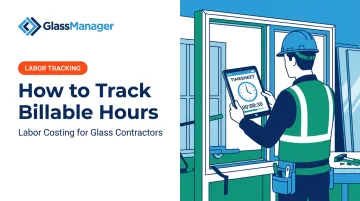
A glazier finishes an install, hops back in the truck, and tries to remember the day. Two hours on-site. Some drive time. A call with the client about a change order. A stop at the shop for a replacement pane. By Friday, half of that gets lost.
Tracking billable hours sounds simple: just write down your hours. But accuracy depends entirely on your method, your tools, and how consistently your team logs time. Sloppy tracking doesn't just create messy timesheets. It erodes revenue you've already earned.
This guide walks through exactly how to track billable hours correctly, what affects accuracy, and the mistakes that cost businesses money. It also covers the tools that actually solve the problem, including specific considerations for field-based trades like glass and glazing.
Key Takeaways
- Billable hours are invoiceable client work; non-billable time needs separate tracking for visibility
- Reliable tracking pairs a consistent method with clear billable-time rules set upfront
- Real-time logging, consistent tagging, and regular review drive the biggest accuracy gains
- Field service businesses need tools that separately track on-site, travel, and shop time
How to Track Billable Hours: Step-by-Step
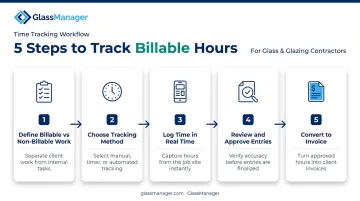
Step 1: Define Billable vs. Non-Billable Work and Set Your Rates
Before anyone logs a minute, decide what actually counts as billable.
Typically billable:
- On-site installation or repair work
- Client-facing calls and site visits
- Direct project prep tied to a specific job
Typically non-billable (unless your contract says otherwise):
- Internal team meetings
- Training and certifications
- Drive time (policy-dependent)
Once categories are set, assign rates. Some businesses use a flat hourly rate, while others blend rates by role, apprentice versus lead installer, for example.
Glazing and construction don't have a single published market rate the way legal services do. Base your numbers on local competitor pricing and your actual labor costs, not industry guesses.
Step 2: Choose Your Tracking Method
Three main options exist, and each fits a different type of operation:
- Manual/spreadsheet logging – Works for solo operators with a handful of clients
- Timer-based apps – Good for desk-based work with clear start/stop tasks
- Automatic or software-based tracking – Best for teams juggling multiple jobs and job sites daily
If your crew works across job sites rather than at a desk, a desktop timer app is the wrong tool. You need something mobile-capable that functions offline, since job sites don't always have reliable signal.
Step 3: Log Time in Real Time, Tagged by Client and Job
Same-day logging beats end-of-week reconstruction every time. Memory fades fast, and short tasks (a 20-minute callback, a quick material run) get forgotten first.
Every entry should be tagged with:
- The specific client
- The job or project number
- The task type (install, repair, consultation)
Without this tagging, you can total hours worked, but you can't tell which client owes for what. That gap is where billable time goes untracked.
Step 4: Review and Approve Entries Regularly
Set a weekly or per-job review cadence. A manager, or the technician themselves, should scan entries for:
- Gaps (missing clock-outs)
- Duplicates (double-logged jobs)
- Miscategorized time (billable marked as non-billable, or vice versa)
This step catches errors before they land on an invoice. Catching a mistake internally costs you five minutes. Catching it after a client disputes an invoice costs you the relationship.
Step 5: Convert Tracked Hours into Invoices
Approved hours should flow into an invoice without being retyped. Manual re-entry is where transcription errors creep in, and it slows down billing cycles that should take hours, not days.
Platforms with integrated job costing and invoicing let approved field hours move straight into a client invoice. GlassManager, for example, ties labor entries logged through its mobile field app directly to the job they were worked on, then auto-fills that job data into the invoice. It's not a fully automatic trigger the moment a timesheet is approved, but it removes the double data entry that causes most billing delays for glazing crews juggling several job sites a week.
Key Factors That Affect Billable Hours Tracking Accuracy
Even the right method fails if these underlying variables go unchecked.
Time Increment and Rounding Rules
Whether you round to the nearest 15 minutes, 30 minutes, or track by the minute changes how much time actually gets captured. Coarser increments tend to underbill short tasks and overbill long ones.
Federal payroll rules under 29 CFR 785.48 permit rounding to the nearest 5 minutes, tenth-hour, or quarter-hour. This is allowed only if the rounding averages out fairly over time and employees are paid for all hours actually worked.
That's a payroll standard, not a customer-billing rule, so don't assume it applies directly to how you invoice clients. Match your increment to your work: a 15-minute callback shouldn't disappear into a 30-minute rounding block.
Capture Method (Manual vs. Automatic, Desk vs. Field)
Manual recall drops short tasks, interruptions, and travel time, especially for mobile crews. Automatic or mobile-first capture, logged near the point of work, consistently produces more complete records than reconstructing a timesheet at day's end.
GlassManager's mobile field app, for example, lets crews log labor directly from the job site and ties entries straight to job costing.
Rate Structure (Hourly, Flat, or Blended)
Mixing flat-fee jobs with hourly billing, without clear tagging, causes hours to be tracked but never actually billed. A defined rate structure tied to each job type stops this "shadow work" from happening.
Team Compliance and Adoption
A tracking system only works if the whole crew actually uses it. Adoption gaps erode accuracy no matter how good the tool is.
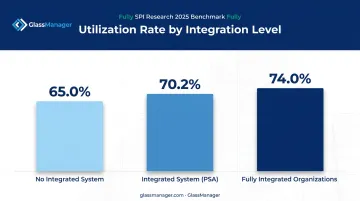
SPI Research's 2025 benchmark on professional services firms found:
- Firms using integrated systems (PSA platforms) hit 70.2% utilization
- Firms without an integrated system averaged 65.0% utilization
- Fully integrated organizations reached 74.0% utilization
Consistent adoption correlates with meaningfully more captured billable time. A great tool that half your team ignores is barely better than no tool at all.
Common Mistakes to Avoid When Tracking Billable Hours
Most billing leaks trace back to a handful of habits:
- Relying on memory instead of real-time logging – Reconstructing hours at end-of-day or end-of-week reliably underreports actual time worked
- Skipping travel, prep, or shop time – This common gap for glaziers moving between job sites means unbilled labor every time it happens
- Using inconsistent categories or client tags – When each technician labels jobs differently, reports and invoices become unreliable fast
- Treating tracking as "set and forget" – Review rates and categories as your business or project mix changes; residential setups rarely fit a new commercial contract
None of these mistakes are dramatic on their own. Stacked together across a crew and a month, they add up to real, uncollected revenue. Tools like GlassManager's real-time labor tracking help close these gaps by logging hours as work happens, not after the fact.
Best Tools & Methods for Tracking Billable Hours
The right tool depends on your business type, team size, and whether work happens mostly at a desk or in the field.
Manual and Spreadsheet Tracking
Best for: Very small teams or solo operators with few clients and simple billing, often tracked in Excel or Google Sheets.
Trade-offs: Low cost, but high risk of forgotten entries and time-consuming manual invoice creation. A missed entry means lost revenue that's hard to reconstruct later. Fine until you add a second technician or a busier season.
General-Purpose Time Tracking Apps
Best for: Desk-based professionals, consultants, agencies, developers, with straightforward timer workflows.
Trade-offs: Feature-rich for office work, but most lack offline field capture, job costing, or trade-specific workflows. Apps like Toggl track hours well at a desk but weren't built for a technician on a job site with no signal.
Industry-Specific Field Management Software
Best for: Businesses with technicians working across multiple job sites who need billable hours tied directly to job costing and invoicing.
| Feature | Generic App | GlassManager |
|---|---|---|
| Offline mobile clocking | Rarely | Yes |
| Job-linked time entries | Sometimes | Yes, tied to project/work order |
| GPS clock-in verification | No | Yes |
| Syncs to job costing | No | Real-time |
| Accounting export | Varies | QuickBooks, Sage 50 |
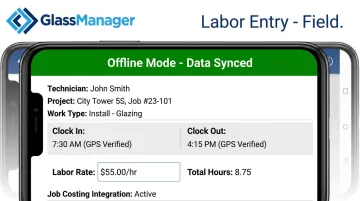
For glazing crews specifically, GlassManager's mobile app lets technicians clock in and out with one tap, even without a signal. Each entry attaches to a specific project, labor rate, and work type like "Install - Glazing." Once the device reconnects, entries sync automatically and feed straight into job costing.
Silver State Glass & Mirror moved off a fully paper-based system onto this kind of workflow and reported saving significant time while boosting revenue. Quality Reflections Glassworks credited a similar shift with taking their operation "from red to green."
Neither result came from the timesheet feature alone, but tighter labor tracking tied to job costing was a documented part of the turnaround.
Frequently Asked Questions
What is the best way to keep track of billable hours?
Combine real-time or same-day logging with a consistent method, whether that's an app or software, and clear rules on what counts as billable. Tag every entry by client and job so nothing gets lost in translation later.
How many hours a day is 2,000 billable hours a year?
Based on roughly 250 working days a year, 2,000 billable hours averages to about 8 billable hours per day. Actual daily targets vary widely depending on your industry's typical utilization rate.
How do you calculate billable hours?
Sum all time logged against client or job tasks, then multiply by the applicable hourly or blended rate. That total is what you invoice, assuming your rate structure is clearly tied to each job type.
What is a realistic billable hours target or utilization rate?
Most service businesses don't target 100% billable time. Legal firms average 37-38% utilization, according to Clio's 2024 Legal Trends Report. Glazing-specific benchmarks aren't well documented, so track your own baseline and improve from there.
Can I track billable hours without software?
Yes, spreadsheets or paper timesheets work. They're just more error-prone and far more time-consuming to convert into invoices compared to app or software-based tracking.
How do glass and glazing or field service businesses track billable hours differently?
Field-based businesses need to separately capture on-site, travel, and shop time per job. That's why industry-specific platforms with mobile field access and job costing, like GlassManager, tend to fit better than generic desk-based time trackers built for office workflows.