Introduction
Scheduling service calls sounds simple. Pick a time, assign a tech, done. But any glass shop owner who's tried to run a full day of measurements, installs, and emergency board-ups knows better.
One missed detail on intake, a technician sent without the right glass size, or an appointment window that runs long can throw off the entire day. The result: lost revenue and a frustrated customer you might never see again.
Why does this get complicated so fast? Technician skill levels vary. Glass lead times aren't always predictable. Travel routes eat into billable hours. And emergency repairs don't wait for a convenient opening in the calendar.
That complexity is exactly why scheduling trips up so many shops. This guide breaks down what it takes to get it right:
- The exact steps to schedule a service call correctly
- The factors that make scheduling accuracy harder than it looks
- The mistakes that trip up most glazing businesses
- When it's time to retire the spreadsheet
Key Takeaways
- Four steps (capture, match, confirm, follow up) prevent most scheduling breakdowns.
- Technician skill, travel buffers, urgency, and material availability determine on-time arrivals.
- Incomplete intake details and double-booking cause most scheduling failures, not poor effort.
- Spreadsheets and whiteboards break down as job volume and technician count grow.
- Field service software automates reminders, technician matching, and calendar visibility.
How to Schedule Service Calls: A Step-by-Step Process
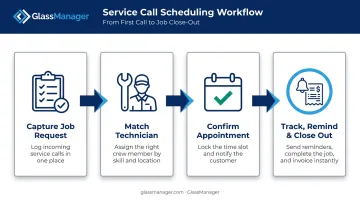
Getting a service call from request to completion reliably comes down to four repeatable steps. Skip one, and you're back to phone tag and double-bookings.
Step 1: Capture the Complete Job Request
Before anything gets scheduled, gather the details that determine everything else:
- Customer contact details — name, phone, email, preferred contact method
- Job address — including access notes (gated community, loading dock, high-rise)
- Service type — measurement, install, repair, or warranty visit
- Urgency indicators — broken glass, storm damage, or a standard follow-up
Each job type carries different lead-time expectations. A warranty call and a bid follow-up don't move at the same speed as a board-up request. Confirm which category you're dealing with before you touch the calendar.
Most glazing businesses route this through a CRM like GlassManager's, which feeds the intake form directly into scheduling so nothing gets booked based on a half-finished phone note.
Step 2: Match the Right Technician to the Job
Not every technician on your crew can handle every job. Before assigning:
- Check availability against existing commitments, not just open slots
- Verify skill match — commercial storefront glazing calls for different experience than a residential shower enclosure
- Confirm tools and stock — does this tech have the glass sizes, hardware, and equipment the job requires?
- Verify safety readiness — site access, working-at-height requirements, and any permits should be confirmed before locking in the assignment
Skipping this step is a common source of rework. Assigning someone unqualified for the job type raises the odds of a callback, adding drive time, labor cost, and a frustrated customer to the ledger.
Step 3: Confirm the Appointment and Set Expectations
Once you've matched the right technician, lock the time slot on a shared calendar so no one else can book into that window. Then confirm with the customer:
- Send a realistic time window — not a specific hour, but a 1-2 hour range
- Explain what to expect — a measurement visit looks different from a full install
- Use automated confirmation tools — built-in SMS and email confirmations, like the messaging tools in GlassManager, cut down the back-and-forth phone calls that eat up office time
This is also where automated reminder tools earn their keep by cutting down on no-shows before they happen.
Step 4: Track, Remind, and Close Out the Job
The day before (or day of), send reminders to both the customer and the technician. On the day of service, field staff should update job status in real time from a mobile app, marking each job en route, on-site, and completed so the office has visibility without needing to call around.
Once a job wraps, close the loop:
- Flag it for invoicing
- Schedule any required follow-up (inspection, second visit, warranty check)
- Update the customer record for future reference
The job isn't fully complete until billing and follow-up are handled, not just when the technician leaves the site.
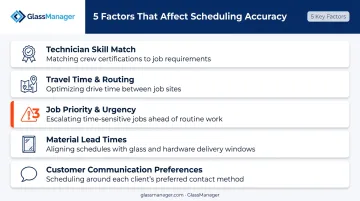
Key Factors That Affect Service Call Scheduling Accuracy
Even a solid four-step process can fall apart if these variables aren't accounted for.
Technician Skill and Certification Match
Assigning an underqualified technician doesn't just risk a bad outcome on-site. It increases job duration and raises the likelihood of a callback.
Field-service research from the Service Council found that the average first-time fix rate across service industries sits around 77%, meaning roughly a quarter of visits require a follow-up. Matching the right skill set to the job reduces your odds of landing in that group.
Travel Time and Route Sequencing
Back-to-back jobs without a buffer window cause cascading delays. One job runs 20 minutes long, and suddenly every appointment after it is late.
Route optimization research from Aberdeen Group found that companies using optimized scheduling saw a 20% increase in completed work orders per technician per day, with real-time re-optimization pushing that figure to 30%.
The data is older and cross-industry, but the mechanism holds true for glazing crews: poor routing burns fuel and shrinks the number of calls a tech can realistically complete.
Job Priority and Urgency
Board-ups, storm damage, and safety-related breaks can't sit in the same queue as a routine install. The National Glass Association's guidance on broken glass is direct: block off the area to prevent injury and begin immediate cleanup and replacement.
Failing to triage urgent calls ahead of standard work creates liability exposure, not just customer frustration.
Glass and Material Lead Times
Plenty of jobs can't move forward until custom-cut glass or hardware arrives. Lead times vary widely by supplier and product, so scheduling a visit before materials are confirmed usually ends in a canceled or rescheduled appointment and wasted technician time.
Confirm material status before you touch the calendar, not after.
Customer Communication Preferences
Some customers want a text, while others expect a phone call. Mismatched communication increases missed appointments.
A 2022 pragmatic randomized study found that an additional targeted text message reduced no-show risk by 7% for general appointments and 11% for behavioral health visits. The study wasn't glazing-specific, but the underlying lesson applies broadly: automated, well-timed reminders reduce no-shows across service industries. GlassManager's built-in SMS and email reminders handle this automatically, giving your office one less manual task to manage before every job.
When Manual Scheduling Starts Costing You Money
A whiteboard or spreadsheet works fine when you've got one or two technicians. Every job fits on one page, and everyone knows the schedule by heart.
That changes fast as job volume grows. You start seeing:
- Double-bookings because two office staff updated different versions of the same calendar
- Lost intake details buried in email threads or sticky notes
- Phone-based confirmations eating into time your team could spend chasing new business
That last point is the real tipping point. Once your team is spending hours a week just verifying technician availability and calling customers to confirm windows, the manual system is actively costing you revenue-generating time.
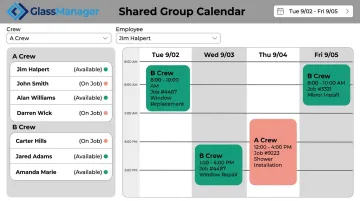
This is where purpose-built field service software pays for itself. GlassManager, built specifically for glass and glazing businesses, replaces the whiteboard with:
- A shared group calendar with crew and employee filters, so office and field see the same real-time schedule
- Gantt chart project timelines for multi-phase commercial jobs (available on Pro and Enterprise plans)
- Automatic notifications when a task changes, keeping office and field aligned without a phone call
- A mobile app for field techs to view job details and update status from the site
- Route planning for sequencing jobs efficiently (Pro and Enterprise tiers)
For a shop still running a two-tech operation, that might feel like overkill. But once you're juggling multiple crews, commercial and residential work types, and a growing volume of warranty calls, the coordination overhead of manual scheduling adds up quickly.
Common Scheduling Mistakes and How to Fix Them
Most scheduling failures trace back to a handful of repeatable mistakes:
- Skipping intake details — staff rush to book a slot without confirming job type, site access, or material availability. Fix: standardize an intake checklist that must be completed before any appointment is locked in.
- Overbooking technicians without travel buffers — job duration alone ignores drive time between sites, creating a domino effect of delays. Fix: build buffer windows into the schedule based on distance and typical job overruns.
- Promising an exact hour instead of a time window — this frustrates customers when a job runs long. Fix: set 1-2 hour arrival windows and send automated updates if a technician falls behind.
- Failing to follow up after the job — leaving invoicing or additional visits unresolved once the technician leaves. Fix: use a system that automatically flags completed jobs for invoicing or follow-up scheduling.
None of these mistakes require a complete process overhaul to fix. They just require consistency, and a system that enforces it. Features like GlassManager's automated SMS reminders and job-completion flags help keep scheduling, invoicing, and follow-up connected automatically.
Frequently Asked Questions
Is there a way to schedule calls?
You can schedule service calls manually using phone calls and a calendar, or automate the process with field service software that matches technicians and sends confirmations and reminders. Software becomes more reliable as call volume increases.
What is customer service scheduling?
Customer service scheduling coordinates when a customer's request, such as an installation, repair, or consultation, gets fulfilled, matching the job against available staff and resources.
How do you prioritize emergency service calls?
Most glazing businesses use a tiered system: emergency and board-up jobs first, warranty visits next, then standard installs. Reserving buffer capacity in the daily schedule for urgent jobs keeps this workable.
What's the difference between scheduling and dispatching?
Scheduling sets the appointment time and technician assignment in advance. Dispatching is the real-time coordination of getting that technician to the job, often involving route or priority adjustments as the day unfolds.
How much lead time should I give customers for service calls?
It depends on job type. Standard installs may need days to weeks for material lead time, while emergency repairs should be same-day or next-day whenever possible.
Can service call scheduling be automated for a small glass business?
Yes. Even small teams benefit from shared calendars and automated reminders. Platforms like GlassManager offer tiered plans, from Lite to Enterprise, that scale as the business grows.