Manual invoice tracking through email threads, paper stacks, and spreadsheets creates real problems: missed payment deadlines, duplicate payments to the same vendor, and job costing that's wrong the moment you close a project. Every one of those mistakes eats into margins that were already thin to begin with.
This guide breaks down what vendor invoice management actually means, why it's uniquely complicated for glazing contractors, which software features actually matter, and how a platform like GlassManager ties it all together.
Key Takeaways
- Vendor invoice management covers receiving, validating, matching, approving, and paying supplier bills
- Glaziers face extra complexity: multiple vendors per job, volatile glass and aluminum pricing, and subcontractor billing
- Automation reduces errors, speeds approvals, and links invoice data straight to job costing
- Purpose-built platforms combine purchase orders, invoicing, and accounting sync with QuickBooks or Sage 50
What Is Vendor Invoice Management?
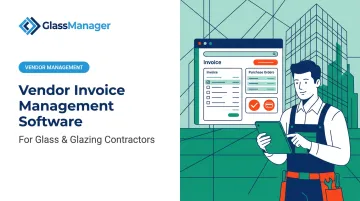
Vendor invoice management is the end-to-end process of receiving, verifying, approving, and paying invoices submitted by your suppliers and subcontractors. It's the accounts payable side of your business, distinct from customer invoicing, which covers the bills you send out for completed jobs.
Glaziers have to run both processes well. You're collecting invoices from glass suppliers and hardware vendors while simultaneously issuing invoices to homeowners, general contractors, and property managers. Mix them up, and your books stop making sense fast.
The Vendor Invoice Lifecycle
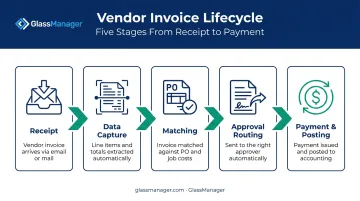
Industry standards from finance operations groups like the Institute of Finance & Management (IOFM) and the American Productivity & Quality Center (APQC) frame accounts payable as a consistent sequence of stages. For a glazing business, each one connects back to a specific job:
- Receipt: Invoices arrive by email, vendor portal, or paper from a glass fabricator, aluminum supplier, or installer
- Data capture: Your team pulls vendor, amount, and line-item details from the document
- Matching: You check the invoice against the purchase order and job cost estimate
- Approval routing: The invoice moves to the right person for sign-off
- Payment and posting: Once approved, you pay it and record it in your accounting system
The critical difference in glazing work: every invoice ties to a job or work order. Lose that connection, and you lose the ability to know whether a project is actually profitable.
Why Vendor Invoice Management Matters for Glass & Glazing Businesses
A single-trade contractor might deal with two or three regular suppliers. A glazier juggles glass fabricators, hardware and track suppliers, sealant distributors, aluminum extrusion companies, and often a tempering shop — all on one storefront installation. That's a lot more invoices to track, match, and reconcile per project.
Material price volatility makes matching non-negotiable. Glass and aluminum prices don't sit still. Aluminum mill shape prices jumped 30.5% year-over-year as of the most recent data tracked by the Associated General Contractors of America, the largest annual increase for that index since 2022. If you quoted a job three months ago based on old pricing, an unmatched vendor invoice can erode your margin before you notice.
Subcontractor invoices create blind spots. Teams often track installer and subcontractor bills separately from material invoices, even though they hit the same job budget. That separation is exactly how total job cost visibility falls apart.
Cash flow suffers when payments are disorganized. Subcontractors nationally wait an average of 57 days for payment, while 73% have supplier terms of 30 days or less, according to Billd's 2024 National Subcontractor Market Report. That mismatch strains supplier relationships, and a glass supplier who feels stiffed on payment terms is far less motivated to prioritize your next rush order.
Job costing accuracy depends on it. You price jobs based on estimated material and labor costs. If actual vendor invoices don't reconcile against those estimates in real time, your profitability reports are fiction by the time you see them.
Must-Have Features in Vendor Invoice Management Software
Generic accounts payable tools built for retail or professional services rarely account for job-level costing. G2's AP Automation category outlines a consistent set of baseline capabilities that any serious platform should offer, and glazing contractors need a few industry-specific additions on top, the kind built into platforms like GlassManager.
- Automated invoice capture: OCR or AI-based extraction of vendor name, amount, and line items from PDFs, emails, and portals eliminates manual entry
- Purchase order and job matching — Invoices should be checked against job-specific POs so costs are validated against what was actually ordered
- Configurable approval workflows: Rules-based routing by dollar amount, vendor, or job keeps invoices moving without bottlenecks
- Real-time job costing integration — Invoice data should flow directly into project cost tracking, not sit in a separate AP silo
- Accounting or ERP integration: Two-way sync with platforms like QuickBooks removes duplicate data entry
- Vendor communication and audit trail — A centralized record of correspondence and invoice history speeds up dispute resolution
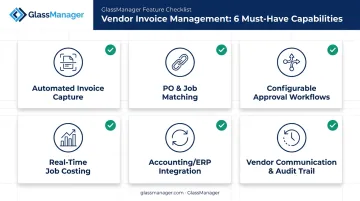
G2's AP automation criteria confirm automated capture, approval workflows, real-time job costing integration, accounting sync, and audit trails as standard expectations across the software category. Purchase order and job matching, however, is where general accounting tools tend to fall short — and where glazing-specific platforms earn their keep.
How GlassManager Simplifies Vendor Invoice Management for Glaziers
Most glaziers end up stitching together a generic accounting tool, a spreadsheet for purchase orders, and email for vendor communication. GlassManager was built to replace that patchwork with one platform designed specifically for residential and commercial glazing contractors.
Purchase Orders Tied Directly to Jobs
GlassManager's Purchase Order module lets you issue POs linked to a specific job. When vendor invoices arrive, you reconcile them against the PO by checking whether amounts, quantities, and prices match what was ordered. Jobs, purchase orders, and vendor invoices stay connected in one system, so tracing a discrepancy back to its source doesn't mean digging through three different tools.
Job Costing That Updates in Real Time
Because vendor invoices feed directly into the Projects module, labor, materials, and overhead costs update as invoices come in rather than waiting for job close-out. That means you spot a cost overrun while there's still time to address it, not after the final invoice lands.
Accounting Sync Without the Double Entry
GlassManager offers a two-way sync with QuickBooks Online, QuickBooks Desktop, and Sage 50, so invoice and payment data moves automatically between systems. You also get batch export for timesheets and detailed export logs, which keeps your books accurate without re-typing anything.
GlassAI Turns Vendor Quotes Into Customer Proposals
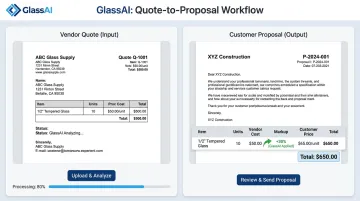
That same vendor pricing data doesn't stop at reconciliation. GlassAI puts it to work on the sales side, turning a vendor quote into a polished customer proposal: upload the quote, add your markup, and send it in seconds — no re-typing product descriptions or costs by hand.
Quality Reflections Glassworks put it simply: "GlassManager helped us go from red to green. It's the backbone of our evolving operation," says owner Guillermo Ramirez. The company credits the platform's real-time analytics with reducing errors and turning a consistent profit.
Choosing the Right Vendor Invoice Management Solution
Not every glazing business needs the same level of software. Start by sizing up your actual invoice volume and vendor count per job. A shop running two or three residential jobs a month has different needs than a commercial contractor managing a dozen active sites.
Prioritize these when comparing options:
- Native accounting integration (not a clunky third-party plug-in)
- Job and PO matching built for construction, not adapted from retail AP tools
- Pricing that scales as your business grows
GlassManager's tiered structure reflects that scaling path:
| Feature | Lite | Professional | Enterprise |
|---|---|---|---|
| Standard customer invoicing | ✅ | ✅ | ✅ |
| Vendor invoices & PO matching | ❌ | ✅ | ✅ |
| Real-time job costing | ❌ | ✅ | ✅ |
| Custom integrations | ❌ | ❌ | ✅ |
A small residential shop might start on Lite for basic supplier organization and customer billing, then move to Professional once vendor invoice reconciliation and job costing become a daily need. Multi-location or large commercial operations typically land on Enterprise for custom integrations and tailored setup.
Frequently Asked Questions
What is vendor invoice management?
It's the process of receiving, validating, approving, and paying invoices from suppliers and subcontractors. For trade businesses, it's directly tied to accurate job costing, since every material and labor bill affects project profitability.
What is a vendor invoice management system?
A vendor invoice management system automates invoice capture, PO matching, approval routing, and payment posting. Most modern systems also integrate with accounting platforms or job costing tools to keep financial records in sync.
How is vendor invoice management different from accounts payable automation?
Vendor invoice management focuses specifically on supplier and subcontractor bills. Broader accounts payable automation can also cover employee expense reports and payroll-related payables.
Can vendor invoice management software integrate with accounting tools like QuickBooks?
Yes. Modern platforms, including GlassManager, offer native integrations that sync invoice and payment data automatically with QuickBooks Online, QuickBooks Desktop, and Sage 50.
Do small glass and glazing businesses need vendor invoice management software?
Once you're juggling multiple suppliers across multiple jobs, manual tracking starts costing you money through missed payments and cost overruns. Even small shops benefit from centralizing vendor invoices early.
How much does vendor invoice management software typically cost?
Pricing depends on business size and features needed. Scalable tiered plans, like GlassManager's Lite, Pro, and Enterprise options, let growing glazing businesses start small and add capabilities as needed.