Introduction
Every glazing job starts the same way: someone has to order the right glass, the right hardware, and the right framing, in the right quantities, at the right time. Get it wrong and the job stalls.
Many glass shops still manage this with sticky notes, disconnected spreadsheets, or a purchase order system that talks to nothing else.
The result? Overordering that ties up cash in materials sitting on a shelf. Stockouts on the one bracket you needed for tomorrow's install. Invoices that don't match what actually showed up on the truck.
Fixing this starts with understanding the process itself. This guide breaks down what a purchase order actually is, the four types you'll encounter, and the step-by-step workflow that keeps inventory and job costs in sync.
We'll also look at how purpose-built software like GlassManager removes the manual reconciliation work that eats into your margins.
Key Takeaways
- A purchase order legally binds you to specific items, pricing, and terms before goods arrive
- Solid PO management prevents overstock and stockouts while giving real-time visibility into committed materials
- Four PO types (one-off, planned, blanket, and contract-based) fit different buying patterns
- Trade-specific software links POs directly to job costing, cutting manual reconciliation and duplicate entry
What Is Purchase Order Inventory Management?
A purchase order (PO) is a formal document a buyer sends to a vendor, specifying items, quantities, agreed pricing, and delivery terms. Once the vendor accepts it, that PO becomes a binding commitment, not just a request.
Purchase order inventory management is the practice of using those POs to control stock levels, forecast material needs, and track incoming goods against what's actually on your shelves.
Done well, it creates a documented audit trail showing exactly what was ordered versus what arrived. That's where most inventory discrepancies get caught before they become expensive.
The financial upside is real. Manufacturers who tightened demand-and-purchasing alignment through formal sales and operations planning have cut inventory investment by 30%, according to a NIST manufacturing case study on Tapecon, Inc. That kind of reduction frees up cash that would otherwise sit in unused stock.
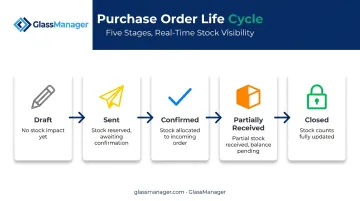
The PO Life Cycle and How It Affects Stock Counts
Every PO moves through stages, and each one changes what your inventory numbers actually mean:
- Draft: Materials are planned but not yet committed; no impact on stock
- Sent: The order is with the vendor; treat as "committed" but not on-hand
- Confirmed: Vendor has accepted terms and pricing; delivery is expected
- Partially Received: Some line items are in stock, others still outstanding
- Closed: Full order received and reconciled; inventory counts finalized
Purchase Order vs. Purchase Requisition: What's the Difference?
A purchase requisition is internal. It's the shop foreman or estimator asking, "I need 40 sheets of tempered glass for the Baker Street job," and getting sign-off before any money moves.
The purchase order is what happens after approval. It's the external, vendor-facing document that actually commits your business to a purchase. The requisition is your internal control step; the PO is the outward-facing contract.
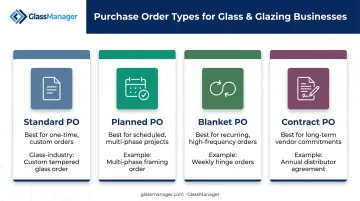
The 4 Types of Purchase Orders and When Glass Businesses Use Them
Not every purchase fits the same mold. Glaziers deal with everything from a single specialty order to year-round hardware supply, so the PO type you use should match the buying pattern.
| PO Type | Best For | Glass Business Example |
|---|---|---|
| Standard (SPO) | One-time or infrequent buys with known items, price, and delivery date | A custom tempered glass order for a one-off commercial storefront |
| Planned (PPO) | Anticipated needs where delivery timing isn't set yet | Aluminum framing for a multi-phase commercial build, delivered in stages |
| Blanket (BPO) | Recurring, high-volume materials from one supplier | Standard glass sheets or hinges ordered weekly, with pricing locked in upfront |
| Contract (CPO) | Long-term vendor terms without fixed quantities | An annual supply agreement with your primary glass distributor |
A Standard Purchase Order works when you know exactly what you need and when. It's the default for specialty or unusual orders that won't repeat.
Multi-phase jobs call for a Planned Purchase Order. You know you'll need the framing eventually, but the exact delivery date isn't locked in yet.
For materials you order constantly, a Blanket Purchase Order saves time. Instead of writing a new PO every week for the same glass sheets, you lock in pricing once and draw against it as needed.
A Contract Purchase Order works differently, governing the vendor relationship rather than a single transaction. It sets terms and negotiated rates with a distributor, leaving quantities and timing to be worked out order by order.
GlassManager's purchase order tools support all four formats, so you can create standard, planned, blanket, or contract POs from the same dashboard and track them against your vendor terms.
The Purchase Order to Inventory Workflow: Step-by-Step
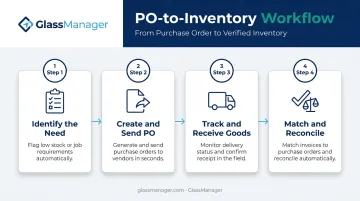
A well-run PO process moves through four distinct stages. Skip one, and your inventory counts or job costs drift out of sync fast.
Step 1: Identify the Need
Material needs get triggered one of two ways: a job estimate or work order specifying required glass and hardware, or an automated low-stock alert firing once inventory hits a reorder point. Either trigger should generate a requisition before anyone contacts a vendor.
Step 2: Create and Send the PO
Once approved, select the vendor, add line items with quantities and negotiated pricing, and send the PO electronically. Skipping the back-and-forth of phone calls or emailed spreadsheets cuts delays and reduces the chance of transcription errors. In GlassManager, this step happens inside the same platform where the estimate was built, so the PO pulls vendor pricing and line items automatically instead of requiring re-entry.
Step 3: Track and Receive Goods
As shipments arrive, log received quantities against the original PO. Flag partial shipments or backorders immediately, since a single truck rarely delivers everything on a multi-line order. On-hand inventory should update the moment goods are logged, not days later.
Step 4: Match and Reconcile
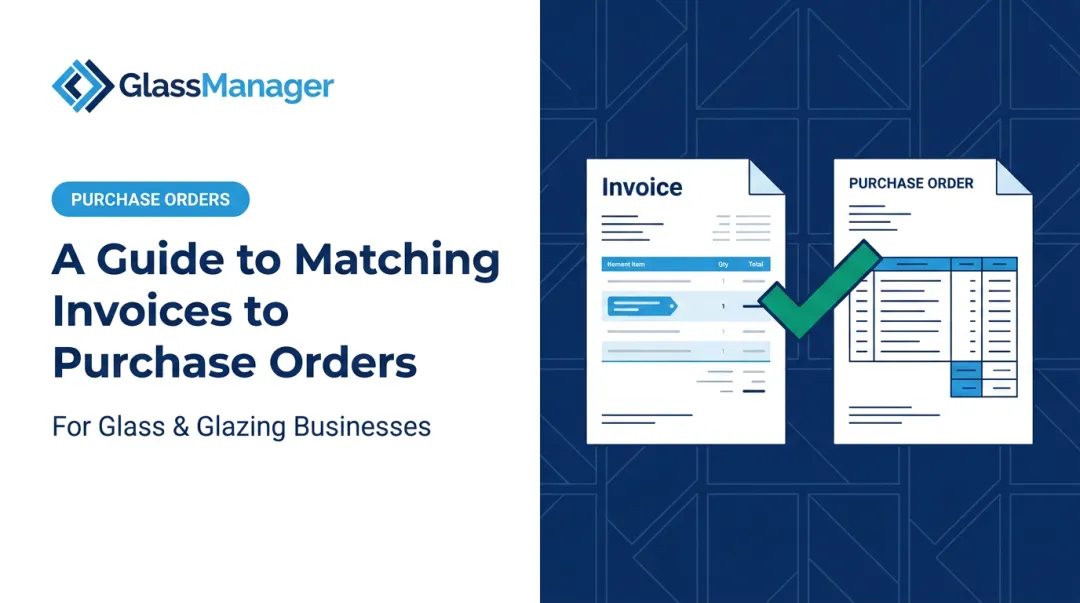
This is where discrepancies get caught before payment goes out. Two-way matching compares the invoice to the PO; three-way matching adds the receipt or packing slip as a third checkpoint.
The gap between manual and automated matching is significant. Best-in-class organizations using automated matching process invoices at 78% lower cost and 82% faster than their peers, according to Ardent Partners' 2024 accounts payable benchmark report. Fewer invoices get flagged for exceptions, and fewer hours get spent chasing down mismatches manually.
Benefits and Common Challenges of PO Inventory Management
Getting PO inventory management right delivers three concrete wins:
- Predictable cash flow — Committed costs are visible the moment a PO is sent, not when the invoice lands
- Stronger vendor relationships — Consistent, well-documented ordering builds trust and often better pricing over time
- Accurate job costing — Materials tied to a specific PO make true project cost tracking possible
Organizations with formal spend visibility processes run leaner too. Businesses with structured spend analysis need roughly 72 FTEs per $1 billion in purchases, compared to 159.4 FTEs for those without one, per APQC's research on spend analysis and procurement performance.
But glass and glazing businesses face challenges other trades don't deal with as often:
- Unpredictable lead times on custom-cut or specialty glass
- Partial deliveries split across multiple active jobs, hard to track in a spreadsheet
- Paper POs or disconnected tools causing stock miscounts and duplicate orders
Most of these issues trace back to one root cause: too many disconnected systems. Centralizing PO creation, vendor management, and inventory tracking in a platform like GlassManager removes the reconciliation gap that causes miscounts in the first place.
How Purpose-Built Software Simplifies PO Inventory Management for Glaziers
Generic accounting software or a shared spreadsheet can technically hold a purchase order. What it can't do is connect that PO to a specific job, so you're often left guessing at true material costs per project until it's too late to fix.
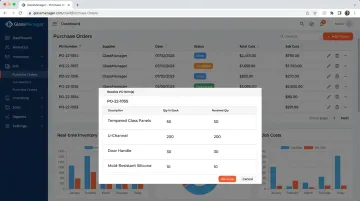
GlassManager's Purchase Orders module, available on the Pro and Enterprise plans, links POs directly to Projects and Work Orders. That connection gives real-time visibility into labor, materials, and overhead for every job, not a rough estimate reconstructed after the fact.
Key capabilities include:
- Item-level receiving: Line items show "Qty in Stock" against "Received Qty," so partial shipments get logged accurately as they arrive
- PO status tracking: Orders move through New, Ordered, and Received statuses, so you can check where every order stands at a glance
- AI-powered invoice extraction: Vendor invoices get read and matched against PO data automatically, cutting manual entry
- Accounting sync: PO and invoice data flows into your accounting platform without duplicate entry
Guillermo Ramirez of Quality Reflections Glassworks put it simply:
"GlassManager helped us go from red to green. It's the backbone of our evolving operation."
That kind of turnaround usually starts with knowing exactly what's been ordered, what's arrived, and what it actually cost against the original estimate.
Frequently Asked Questions
What is a purchase order (PO) in inventory?
A PO is a formal document a buyer sends a vendor specifying items, quantities, and pricing. Once accepted, it becomes a binding commitment used to track incoming stock against what was ordered.
What is the difference between a purchase order (PO) and a purchase requisition (PR)?
A requisition is the internal request for approval before spending happens. The PO is the external document sent to the vendor once that request is approved.
What are the 4 types of purchase orders?
The four main types are:
- Standard – one-time buys
- Planned – known items with flexible delivery
- Blanket – recurring orders with locked pricing
- Contract – long-term vendor terms without fixed quantities
How does purchase order management improve inventory accuracy?
POs create a documented record of expected stock. Businesses can match received goods against that record and catch discrepancies before they distort stock counts.
Can purchase order software integrate with accounting systems?
Yes. Modern PO software typically syncs with platforms like QuickBooks and Sage 50, eliminating duplicate data entry and keeping financial records aligned with actual inventory movements.
How do purchase orders help with job costing in glass and glazing businesses?
Linking POs directly to a specific project or work order gives real-time visibility into material costs against the original estimate. That visibility is what protects margins on custom or multi-phase jobs.