A purpose-built construction CRM changes that equation. It connects your bid pipeline, client communication, and project data in one place, so your office team and field crews are actually working from the same playbook.
The urgency here is real. Global construction software is valued at $10.76 billion in 2025 and is projected to climb from $11.78 billion in 2026 to $24.72 billion by 2034, according to Fortune Business Insights. Contractors who delay adoption are falling behind competitors who've already made the switch.
TL;DR
- Construction CRM software centralizes leads, bids, client communication, and project data around contractor-specific workflows.
- Your best fit depends on contractor type, from general contractors to niche trades like glass and glazing.
- Prioritize industry fit, accounting/estimating integrations, mobile access, and support responsiveness over brand name alone.
- This guide compares five platforms: Procore CRM, Buildertrend, JobNimbus, TopBuilder, and GlassManager, each suited to a specific contractor type.
Overview of Construction CRM Software for Contractors
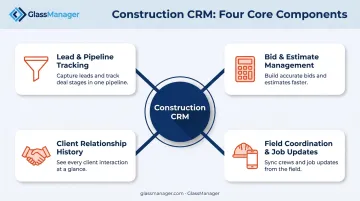
A construction CRM is software built around how contractors actually estimate, bid, and deliver work, not a generic sales tool retrofitted for the trades. It typically covers:
- Lead and pipeline tracking from first contact through contract award
- Bid and estimate management tied to real takeoffs and pricing
- Client relationship history across long, multi-stage sales cycles
- Field realities like subcontractor coordination and job site updates
Adoption momentum backs this up. According to AGC's 2025 Construction Outlook survey of 1,109 firms, 26% planned to increase their CRM software investment. That's notable since most respondents did $50 million or less in annual work, a meaningful signal from small-to-mid-sized contractors, not just enterprise players.
With that investment trend in mind, the five platforms below each serve a distinct contractor niche. Some are built for sprawling commercial projects; others are purpose-built for a single trade. Picking the right one starts with knowing which category you fall into.
Top Construction CRM Software for Contractors in 2026
Our selection criteria focused on five things: industry specialization, integration depth, mobile accessibility, scalability, and customer support quality. Here's how each platform stacks up.
Procore CRM
Procore built its name as a construction management platform, and its CRM module extends that into lead tracking and bid management for the full sales lifecycle. It's designed for firms juggling complex construction bids across multiple stakeholders.
What sets Procore apart is how deeply its CRM ties into project execution: sales-stage data (estimators, margins, project variables) carries over the moment a bid converts to a job. That's a real advantage for firms managing multi-phase commercial work where handoffs between sales and delivery teams often lose information.
| Key Features | Lead tracking, project management integration, client communication tools |
|---|---|
| Pricing | Custom, quote-based on annual construction volume (verify current pricing on Procore's site) |
| Best For | Large construction companies managing complex, multi-phase projects |
Buildertrend
Buildertrend is built for residential builders and remodelers who need scheduling, budgeting, and client communication under one roof. The focus stays on keeping homeowners informed and managing day-to-day project details rather than chasing massive commercial bids.
The mobile app and homeowner-facing client portal are the standout features. Clients can see project updates, approve change orders, and make payments online, which cuts down on the "just checking in" phone calls that eat up a project manager's day.
| Key Features | Scheduling, budget tracking, mobile app access, client portal |
|---|---|
| Pricing | Tiered monthly plans (custom quote; verify current pricing on Buildertrend's site) |
| Best For | Small to mid-sized residential contractors and remodelers |
JobNimbus
JobNimbus started as a roofing CRM and expanded into a broader tool for exterior trades and small construction businesses. It combines CRM functionality with lightweight project management, built to scale as a contractor grows from a single crew to multiple locations.
Customizable pipelines let roofing and trade contractors match the software to their actual sales stages, rather than forcing a generic pipeline onto a specialized workflow. Field crews get real-time mobile updates, so photos, estimates, and job status sync the moment they're entered.
| Key Features | Lead tracking, scheduling, document management, mobile access |
|---|---|
| Pricing | Custom/quote-based; plans scale by user count (verify current pricing on JobNimbus's site) |
| Best For | Roofing contractors and small trade/construction businesses |
TopBuilder
TopBuilder is purpose-built for commercial contractors, EPCs, and specialty firms whose business runs on relationship-driven bidding and long sales cycles with general contractors. It's designed for firms juggling dozens of active bids at once.
Native bid management is the core differentiator, backed by integrations with Procore, Sage, and STACK. Analytics break down win rates by GC and project type, giving business development teams real data on where to focus their energy instead of guessing.
| Key Features | Bid management, pipeline analytics, integrations with accounting/estimating tools |
|---|---|
| Pricing | Custom, demo-based (contact TopBuilder for a personalized quote) |
| Best For | Commercial GCs, specialty contractors, and EPC firms tracking bid performance |
GlassManager
GlassManager takes a different approach: it's an all-in-one business management platform built exclusively for residential and commercial glass and glazing contractors. Rather than bolting CRM onto a generic construction tool, it combines CRM, estimating, scheduling, and invoicing into one system designed around how glass shops actually work.
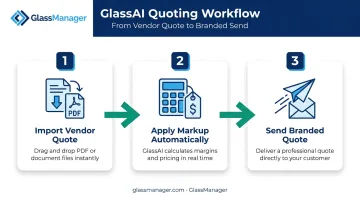
The standout feature is GlassAI, an AI-powered quoting engine that converts vendor quotes into customer-ready proposals almost instantly. Here's the workflow:
- Import the vendor quote: drag-and-drop a PDF, and GlassAI auto-extracts every line item.
- Apply markup automatically: your custom pricing and terms get added without manual math.
- Send a branded quote: a polished, customer-facing proposal goes out in seconds, not hours.
That speed matters in competitive bidding. Beyond quoting, GlassManager offers real-time job costing, integrated SMS and Messenger communication for both customers and crews, and a mobile field app for on-site updates.
Its accounting sync with QuickBooks and Sage 50 covers invoices, payments, timesheets, and vendor bills, cutting out duplicate entry entirely. Support response times typically run under 5 minutes via live chat.
| Key Features | AI quoting (GlassAI), CRM, work orders, scheduling, field mobile app, accounting integration |
|---|---|
| Pricing | Lite, Pro, and Enterprise tiers scaling with business size (visit GlassManager for current pricing) |
| Best For | Residential and commercial glass and glazing contractors needing an industry-specific, unified platform |
Key Features Every Contractor Should Look for in a Construction CRM
Not every CRM feature matters equally. Focus on the ones that directly reduce missed follow-ups and duplicate work.
Must-have core features:
- Lead and bid management with automated status tracking
- Project and document tracking tied to each job
- Client communication logs that capture every call, text, and email in one place
Integration depth matters just as much. A CRM that doesn't talk to your accounting or estimating software forces someone on your team to re-enter the same data twice. GlassManager's two-way sync with QuickBooks and Sage 50, for example, pushes invoices, payments, and timesheets automatically, so bookkeepers aren't chasing down numbers manually.
This isn't just a nice-to-have. Nearly 43% of construction firms cited the time needed to implement and train on new technology as a challenge, per AGC's 2024 construction technology survey of 1,293 firms. Poor integration compounds that pain, and it's exactly why the choice between platform types deserves its own look.
Generic vs. industry-specific CRMs — when each makes sense:
| Factor | Generic, Customizable CRM | Industry-Specific Platform |
|---|---|---|
| Setup time | Longer, requires configuration | Faster, workflows pre-built for the trade |
| Trade fit | Requires heavy customization | Matches existing processes out of the box |
| Best for | Multi-trade or diversified firms | Single-trade specialists (roofing, glazing, etc.) |
If your business runs a narrow, specialized workflow, like glass and glazing, a purpose-built platform typically wins on time-to-value. Diversified firms with varied project types may get more mileage from a flexible, customizable system.
How We Chose the Best Construction CRM Software
We evaluated each platform against how well it matches real contractor workflows, not just feature lists. A common mistake we see: contractors pick a generic, well-known CRM and then spend months customizing it to fit trade-specific bidding or job-costing needs that an industry-built tool already handles natively.
Our evaluation factors, tied to business outcomes:
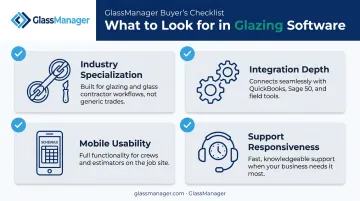
- Industry specialization: Does the CRM understand your trade's bid structure and sales cycle, or are you forcing a square peg into a round hole?
- Integration depth: Does it sync with your accounting and estimating tools, or create more manual reconciliation work?
- Mobile usability: Can field crews update job status and communicate with the office in real time?
- Support responsiveness: When something breaks mid-bid, how fast can you get a human on the line?
Capterra's buyer research echoes this. Its construction software buyer guidance recommends weighing ease of use, integrations, mobile availability, and support options ahead of raw feature counts. These factors connect directly to faster bid turnaround and steadier cash flow, even when hard causal data on percentage gains is limited industry-wide.
Conclusion
No single construction CRM works best for every contractor. The right platform depends on your trade, your project complexity, and how your team actually works. A commercial GC juggling multi-stakeholder bids needs different tools than a residential remodeler managing homeowner communication.
Before committing, weigh these three factors:
- Scalability as your business grows
- Integration ecosystem depth across your existing tools
- Total cost of ownership, including training and onboarding time
If you're a glass or glazing contractor looking for an all-in-one, AI-powered platform built specifically for your trade, GlassManager is worth exploring. Customers like Quality Reflections Glassworks have described it as the backbone of a profitability turnaround. GlassManager's own data points to a 65% reduction in quoting time for shops that adopt it.
Frequently Asked Questions
What are the top construction CRM software options?
The top five options are Procore CRM, Buildertrend, JobNimbus, TopBuilder, and GlassManager. Each fits a different niche, from large commercial GCs (Procore) and residential builders (Buildertrend) to glass and glazing specialists (GlassManager).
What features should a construction CRM have?
Look for lead and bid management, project tracking, mobile access for field crews, and integrations with your accounting and estimating tools. These reduce missed follow-ups and duplicate data entry.
How much does construction CRM software cost?
Pricing typically ranges from per-user monthly plans to fully custom quotes based on business size or project volume. Niche platforms like GlassManager offer tiered plans (Lite, Pro, Enterprise) that scale with your business.
Is there a CRM built specifically for specialty trade contractors like glaziers?
Yes. GlassManager is purpose-built for glass and glazing businesses, combining CRM, AI-powered estimating, job management, and invoicing in one platform designed around glazing workflows.
Can construction CRM software integrate with accounting tools like QuickBooks?
Most leading construction CRMs offer accounting integrations. GlassManager, for instance, syncs invoices, payments, and timesheets with QuickBooks and Sage 50 to keep financial data accurate without manual re-entry.
How long does it take to implement a construction CRM?
Implementation timelines vary by vendor and data complexity. Some platforms report setup in a few days with training taking 1-2 weeks, while others follow guided onboarding sequences lasting several weeks.