
Introduction
Picture a glazier who just finished installing a storefront window. The job's done, the customer's happy, but now the paperwork starts.
The invoice gets typed up in one tool, emailed separately, and payment (if it arrives) has to be manually matched back to the job. Weeks pass. Cash flow suffers.
This disconnect isn't rare. Manual reconciliation, duplicate data entry, and delayed payments are common pain points when invoicing, accounting, and payment collection live in separate systems. For trade and field-service businesses especially, every re-entered line item is time stolen from actual work.
Integrated payment systems solve this by connecting payment processing directly to the software businesses already use. Below, we'll break down what these systems are and how they work, with real examples for glass and glazing companies.
Key Takeaways
- Payment processing is built directly into CRM, invoicing, and accounting software
- Transaction data syncs automatically, eliminating manual reconciliation
- Businesses gain faster cash flow, fewer errors, and stronger reporting
- Glaziers and other field-service teams connect quoting, job completion, and payment in one workflow
What Are Integrated Payment Systems?
An integrated payment system embeds payment acceptance directly inside the business software a company already uses, rather than running it through a separate terminal or standalone gateway. The payment lives inside the invoicing, CRM, or job management tool itself.
The Mechanism Behind It
APIs connect the payment function to the rest of the business platform. When a customer pays, that transaction talks directly to accounting, inventory, and job records, updating them automatically instead of waiting on someone to key in the data later.
Three pieces work together in every transaction:
- Payment gateway — captures and transmits the transaction data securely for authorization
- Payment processor — moves the actual funds between the customer's bank and the merchant's account
- ISV (independent software vendor) — the software provider, like a CRM or field-service platform, that embeds the payment flow into its own product
Here's how that plays out in practice: a customer clicks "Pay Now" on an invoice. The gateway captures the card details and sends them for authorization. The processor settles the funds with the banks involved. The ISV's software (the invoicing platform itself) records the payment and updates the job file, all within seconds.
Adoption Is Accelerating Fast
This kind of automation isn't a niche trend. US small and mid-sized business adoption of integrated software vendor payment solutions jumped from 48% in 2022 to more than 90% in 2025, according to McKinsey's research on ISV maturity. Revenue through this channel grew at roughly three times the rate of traditional payment processing over the same period.
For trade businesses, this matters because the traditional path (quote, then invoice, then chase payment through a separate system) creates friction at every handoff. A glazier who quotes a storefront job, completes installation, and generates an invoice shouldn't have to re-enter that same information into a third tool just to get paid.
Integrated systems close that gap by keeping the job, the invoice, and the payment tied together from start to finish.
How Do Integrated Payment Systems Work?
Integrated payments rely on APIs and SDKs that link a business's software, whether that's a point-of-sale system, invoicing tool, or field management app, to a secure payment processor behind the scenes. The business doesn't manage the payment infrastructure directly; it just calls on it through the software interface.
GlassManager, for example, builds this connection directly into its invoicing and job management modules, so glaziers can collect payment without ever leaving the platform.
The Transaction Lifecycle
Here's the typical sequence when a payment is collected through an integrated system:
- A payment request is generated from an invoice, estimate, or work order inside the software
- The customer pays via card, ACH, or a mobile-friendly link, without needing a separate login
- The transaction routes through the gateway and processor for authorization and fund transfer
- Records update automatically across accounting, job status, and reporting dashboards
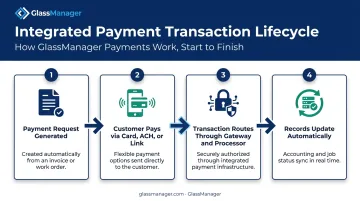
That last step is where the real value shows up. A paid invoice doesn't just disappear into a payment provider's dashboard. It reflects instantly in the job file, marks the invoice "Paid," and feeds into revenue reporting, all without anyone touching a keyboard.
Security Isn't an Afterthought
Two mechanisms protect sensitive data throughout this process. Tokenization replaces the actual card number with a randomly generated token that has no mathematical link back to the original data, while encryption scrambles data in transit so it's unreadable to anyone without the decryption key.
Any system handling cardholder data, integrated or not, still has to meet PCI DSS requirements, the industry's baseline security standard covering everything from network protection to access controls. PCI DSS v4.0.1 is the current version, and integration doesn't remove that obligation. It just makes compliance easier to manage since fewer systems are touching raw card data.
One Workflow, Every Channel
Integrated systems also support omnichannel collection: in-office card payments, online invoice links, and mobile payments collected by a technician on-site. For businesses with installers working in the field, this matters.
A glazier finishing a job at a customer's home can collect a deposit or final payment on a tablet, without needing separate hardware or a second system back at the office.
Benefits of Integrated Payment Systems
Benefits for Businesses
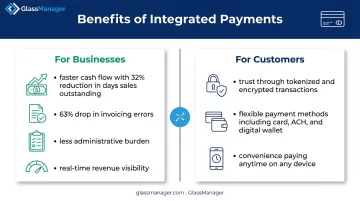
The most immediate win is cash flow. When invoices sync directly to payment collection, businesses get paid faster and spend less time chasing outstanding balances.
Among CFOs at companies automating more than half their accounts receivable process, PYMNTS research found a 32% reduction in days sales outstanding, roughly 19 days faster. That same study tied automation to a 63% drop in invoicing errors.
Beyond speed, businesses see:
- Less administrative burden — staff aren't re-entering payment data across three different tools
- Fewer manual errors — automated syncing removes the guesswork from matching payments to jobs
- Real-time visibility — dashboards reflect revenue and job profitability as it happens, not after a monthly close
Benefits for Customers
Customers benefit too, and that shows up in how quickly they pay. They can settle an invoice through the exact same platform where they received a quote, no separate portal, no new login.
Other advantages include:
- Trust at the point of payment — encrypted, tokenized transactions protect every purchase
- Flexibility — choose card, ACH, or digital wallet within one connected checkout
- Convenience — pay on any device, at any hour
Platforms like GlassManager, which bundle payment processing directly into invoicing and job costing, deliver these gains without adding another app to the workflow.
Integrated vs. Non-Integrated Payment Systems
The difference between integrated and traditional payment setups comes down to how much manual work sits between a completed sale and a reconciled book.
| Factor | Non-Integrated (Traditional) | Integrated |
|---|---|---|
| Reconciliation | Manual matching of payments to invoices | Automatic, real-time updates |
| Tools involved | Separate terminal, separate accounting software | Single connected platform |
| Data entry | Duplicate entry across systems | Entered once, synced everywhere |
| Billing cost per invoice | Averages $9.40 for paper-based billing | Drops to roughly $2.78 with automation |
That gap in billing cost comes from PYMNTS' tracker on bill pay automation, which also found automated billing cycles averaging 3.1 days versus 9.2 days for paper-based processes.
Traditional setups don't just cost more. They introduce more places for things to go wrong.
Common failure points include:
- Re-typing invoice totals into a separate accounting system
- Matching bank deposits to the correct job by hand
- Reconciling partial payments across disconnected records
Integrated systems remove those handoffs entirely, which is why platforms like GlassManager build payment processing directly into the invoicing and job workflow instead of treating it as a separate step.
Real-World Examples of Integrated Payment Systems
Integrated payments show up across nearly every industry, just tailored to how that business operates.
- E-commerce: Shopify embeds payment methods like PayPal directly into checkout, so a customer never leaves the storefront to complete a purchase.
- Accounting software: QuickBooks lets customers pay invoices directly within the platform, with payment status updating the invoice automatically.
- Point-of-sale: Retail POS systems like Square process a sale and adjust inventory counts simultaneously, no separate stock update required.
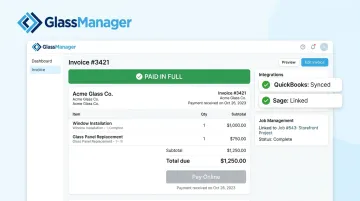
For trades and field service, GlassManager works the same way. Glaziers send invoices with a built-in "Pay Online" button, and customers can pay by card or ACH straight from their phone, no portal login needed.
That payment automatically links back to the job and invoice, marking it "Paid" and syncing with QuickBooks Online, QuickBooks Desktop, or Sage 50, without anyone re-entering a thing.
For commercial glazing jobs, this extends into AIA progress billing. GlassManager auto-generates G702 and G703 forms from job data, calculates retainage automatically, and lets clients pay each progress invoice online as it's issued.
"We now process payments faster, are more organized in the office and in the field. We have saved a considerable amount of time and money with the entire system." — Frank Ciancone, City Window & Glass
Frequently Asked Questions
What is integrated payment processing?
Integrated payment processing embeds payment acceptance directly inside business software like invoicing or CRM tools, so transactions update accounting and job records automatically without manual entry.
What is an example of an integrated payment system?
Examples include Shopify's embedded checkout, QuickBooks' in-platform invoice payments, and trade-specific tools like GlassManager, which connects invoicing, job records, and online payments for glazing businesses.
What is the difference between integrated and non-integrated payments?
Integrated payments sync automatically across accounting, job, and reporting systems. Non-integrated payments require manual reconciliation between separate tools, increasing the risk of errors and delays.
Are integrated payment systems secure?
Reputable integrated systems use tokenization and encryption to protect card data, and they operate under PCI DSS compliance standards. Integration reduces how many systems touch raw payment data, though it doesn't eliminate a business's security obligations.
How much does it cost to set up an integrated payment system?
Costs vary by provider, transaction volume, and whether payment processing is bundled into existing software. GlassManager, for example, matches or beats a business's current processing rates with no added monthly fees.
Can service-based businesses like glaziers use integrated payment systems?
Yes. Field-service and trade businesses benefit, since platforms like GlassManager connect quoting, job management, and payment collection. Technicians can collect payments on-site or send invoice links that pay directly into the job record.