Introduction
Tighter deadlines, thinner crews, and more subcontractors than ever are turning spreadsheets and whiteboards into liability risks.
In fact, 78% of contractors reported at least one project delay in the past year, and 45% pointed to labor shortages as the cause, according to the AGC's 2025 Workforce Survey.
Construction scheduling software fixes the coordination gap. It aligns crews, equipment, and subcontractors around a single timeline, cutting the guesswork out of resource allocation and cost control.
This need extends well beyond general contractors. Specialty trades, including glass and glazing companies, now require scheduling tools built around their specific workflows, not retrofitted from generic templates.
Below, we break down the seven best platforms for 2026 and how to pick the right one for your crew.
TL;DR
- Scheduling software prevents delays by keeping crews and equipment aligned with real-time project timelines
- It keeps subcontractors, field teams, and office staff working from the same information
- Look for scalability, mobile access, third-party integrations, and glazing-specific features when comparing tools
- This guide compares 7 platforms suited to large GCs, residential builders, specialty trades, and multi-crew subcontractors
- Glass and glazing contractors have unique needs that general construction tools often miss
Overview of Construction Scheduling Software in the Construction Industry
Construction scheduling software is a digital system for planning, tracking, and adjusting project timelines, crew assignments, and resource allocation as conditions change in real time. Instead of static spreadsheets, these platforms update automatically as tasks shift, notifying everyone affected.
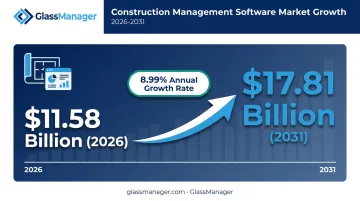
The market reflects how essential this has become. Mordor Intelligence estimates the construction management software market at $11.58 billion in 2026, growing to $17.81 billion by 2031 — an 8.99% annual growth rate. That scope covers scheduling, project management, cost accounting, and estimation tools together.
General platforms like Procore and Buildertrend dominate headlines, but they're often built with commercial general contractors (GCs) or residential builders in mind. Specialty trades, from electrical to glass and glazing, increasingly need scheduling tools shaped around their own job types, material dependencies, and crew structures. That's where the list below gets interesting.
Top 7 Best Construction Scheduling Software for 2026
We evaluated each platform on feature depth, industry fit, ease of use, pricing transparency, and customer trust.
Procore
Procore is an enterprise-grade construction management platform built around Gantt-based scheduling, RFI tracking, and submittal management for commercial general contractors running complex, multi-phase jobs.
Its biggest strength is its ecosystem: 500+ integrations and apps, plus tight document control that ties schedules directly to daily logs and RFIs. The tradeoff is a steeper learning curve and pricing that requires a custom quote based on annual construction volume.
| Best For | Large commercial general contractors managing complex, multi-phase projects |
| Pricing | Quote-based; no published per-user cost |
| Key Features | Gantt scheduling, critical-path tracking, RFI/submittal management, BIM integration |
Buildertrend
Buildertrend takes a calendar-based approach to scheduling, built specifically for residential builders and remodelers who need to keep homeowners in the loop.
What sets it apart is the client-facing portal: homeowners can view timelines, approve selections, and sign off on change orders without a phone call to the office. It's less useful, however, for commercial GCs or trades that need heavy crew-dispatch functionality.
| Best For | Residential builders, remodelers, and home renovation companies |
| Pricing | Quote-based; request demo for pricing |
| Key Features | Calendar/Gantt scheduling, client portal, CRM, budget tracking |
Autodesk Build
Part of the Autodesk Construction Cloud, Autodesk Build is designed for large, BIM-heavy commercial and infrastructure projects where design and construction data need to stay connected.
Schedule activities link directly to models, RFIs, submittals, and documents, giving teams a single source of truth from design through construction. That depth comes at a cost: pricing is enterprise-level, and implementation typically takes longer than lighter-weight tools.
| Best For | Large contractors and infrastructure projects requiring BIM-tied scheduling |
| Pricing | Custom/enterprise pricing |
| Key Features | Schedule management tied to documents, RFIs, and submittals; BIM integration |
Smartsheet
Smartsheet brings Gantt charts and workflow automation to a spreadsheet-style grid interface that most office teams already understand intuitively.
It's a smart pick for teams outgrowing Excel: minimal learning curve, over 175 native integrations, and flexible views (grid, Gantt, calendar, board). What it lacks is construction-specific functionality: no built-in cost codes, no GPS crew tracking, no field-specific tools.
| Best For | Teams outgrowing Excel who want flexible, customizable scheduling |
| Pricing | Starts around $9/user/month (billed annually) |
| Key Features | Gantt/calendar/board views, workflow automation, 175+ integrations |
Fieldwire
Fieldwire, now branded Fieldwire by Hilti, is a mobile-first tool built around plan viewing, drawing markups, and punch lists rather than full project scheduling.
Its free Basic tier (five users, three projects) makes it genuinely usable for small crews, and offline access means field teams can update tasks without signal. Just don't expect it to handle crew dispatch or payroll; that's outside its scope.
| Best For | Field teams and documentation-heavy specialty contractors |
| Pricing | Free Basic plan; paid tiers from $39/user/month |
| Key Features | Plan viewing, punch lists, task management, offline access |
Jobber
Jobber is built for small service contractors and trades running client-facing jobs, combining scheduling with quoting, invoicing, and CRM in one system.
Drag-and-drop scheduling, route optimization, and online payments make it an efficient all-in-one for smaller operations. It's not designed for large, multi-phase construction projects with complex dependencies.
| Best For | Small service contractors and specialty trades running client-facing jobs |
| Pricing | Starts around $29/month |
| Key Features | Job scheduling, route planning, quotes/invoicing, client CRM |
GlassManager
GlassManager is an all-in-one platform built exclusively for residential and commercial glass and glazing contractors, pairing scheduling with CRM, estimating, and invoicing in a single system.
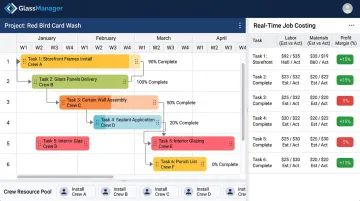
Its Gantt chart timelines give project managers real-time visibility into task dependencies and milestones on multi-phase glazing jobs, while a drag-and-drop scheduling calendar handles crew dispatch. Scheduled tasks automatically generate timesheet entries that feed directly into job costing, giving managers visibility into profit margins as work happens rather than after the fact.
Where it stands apart from generic platforms is materials-aware scheduling. Dispatch reflects what's actually in stock and what's been ordered through the Vendor & Purchase Order module, so crews arrive with the right glass and hardware. The mobile field app works offline, letting installers manage punch lists, capture photos, and clock in with GPS verification even without signal.
| Best For | Residential and commercial glass and glazing contractors needing scheduling built into a trade-specific platform |
| Pricing | Lite, Pro, and Enterprise tiers that scale with business size |
| Key Features | Gantt chart scheduling, drag-and-drop dispatch, real-time job costing, integrated CRM and invoicing |
How We Chose the Best Construction Scheduling Software
A common mistake contractors make is picking software for brand recognition rather than fit. The best tool for a 500-person GC is rarely the best tool for a five-person glazing crew, regardless of what's trending on review sites.
Scalability and usability. The platform should handle a single small job just as well as a multi-site build, with onboarding measured in hours, not weeks.
Integration and mobile functionality. Scheduling software needs to sync with accounting, CRM, or BIM tools, and it needs to give field crews real mobile access — not a stripped-down version of the desktop app.
Customization, support, and security. Look for:
- Adaptable templates that match your actual workflow
- Support teams that respond quickly when something breaks mid-job
- Role-based permissions that protect sensitive project data
Industry fit matters as much as feature count. A general contractor and a specialty glazier need different things from a schedule. Choosing a platform built for your trade cuts down on workarounds and gets your team actually using it.
Benefits of Using Construction Scheduling Software
Centralized schedules with automated notifications close the communication gap between office, field, and subcontractors. When a task shifts, everyone affected finds out immediately instead of showing up to a job that already moved.
That visibility matters more than most contractors realize. According to FMI, a construction consulting firm, poor labor productivity costs the industry $30-40 billion annually, and 79% of contractors could improve labor productivity by at least 6% through better project management, including scheduling.
Built-in analytics and reporting take this further by surfacing bottlenecks early:
- Real-time dashboards flag which jobs are running behind before deadlines slip
- Job costing data shows profit margins throughout a project, not just at completion
- Automated timesheets eliminate the guesswork in labor cost tracking
For a glazing contractor juggling five job sites in a week, that kind of early warning system is the difference between catching a scheduling conflict and explaining a missed installation to a client.
Conclusion
There's no single "best" construction scheduling software. The right choice depends on matching project complexity, crew structure, trade specialization, and budget constraints, rather than chasing whichever platform has the most name recognition.
Before committing, test these factors against your actual workflow, not a sales demo's best-case scenario:
- Scalability as crews and job volume grow
- Integration depth with your existing accounting and field tools
- Total cost of ownership beyond the sticker price
Glass and glazing contractors in particular tend to outgrow generic tools quickly. A trade-built platform like GlassManager pairs scheduling with quoting and invoicing, plus on-site field management, in one system, so crews stop juggling separate apps for work that's fundamentally connected.
Frequently Asked Questions
What software do most construction companies use?
Adoption varies by company size and trade. Large general contractors often use Procore or Buildertrend, while specialty trades increasingly adopt purpose-built platforms designed around their specific job types and workflows.
What is the most popular method for scheduling construction projects?
Gantt charts and the Critical Path Method (CPM) are the most widely used scheduling approaches. Gantt charts visualize task timelines, while CPM identifies which sequence of dependent tasks determines your shortest possible completion date.
Can AI create a construction schedule?
AI can analyze historical job data and crew productivity to suggest schedules and flag risks before they cause delays. Most platforms today use AI to assist scheduling decisions rather than fully automate the process.
How much does construction scheduling software typically cost?
Pricing ranges from free basic tools to quote-based enterprise platforms. Costs generally scale with crew size and feature depth — expect around $9/user/month for spreadsheet-style tools up to custom enterprise pricing.
Is there scheduling software built specifically for specialty trades like glass and glazing contractors?
Yes. Trade-specific platforms like GlassManager combine scheduling with quoting, CRM, and invoicing tailored to glazier workflows, including materials-aware dispatch that generic construction tools don't offer.
What's the difference between a Gantt chart and Critical Path Method (CPM) scheduling?
Use a Gantt chart when you need a client-friendly view of what's happening and when. Reach for CPM when you need to know which specific tasks, if delayed, would push back your finish date.